
Use this Roblox game revenue calculator to estimate Robux earnings and DevEx cash-out value.
Live EstimatorRoblox Game Revenue Calculator
Inputs
Player spending
Extra income
DevEx and team
Estimated Results
Earnings Breakdown
| Line | How It Is Worked Out | Robux | US Dollars | Share of Spent |
|---|---|---|---|---|
| SPENT Robux spent | ||||
| ROBLOX Roblox’s share | ||||
| SALES Earned from sales | ||||
| OTHER Other Earned Robux | ||||
| COSTS Monthly costs | ||||
| DevEx Value After Costs |
Spending Scenarios
This table scales Robux spent only. Creator share, rate, and costs stay fixed.
| Scenario | Robux Spent | Earned Robux | DevEx Value | Yearly After Costs |
|---|
This tool gives estimates only. See our Disclaimer and Tools Policy.
On this page
- Roblox Game Revenue Calculator Overview
- What Is a Roblox Game Revenue Calculator?
- Who Should Use the Roblox Game Revenue Calculator?
- How to Use the Roblox Game Revenue Calculator Step by Step
- How the Roblox Game Revenue Calculator Works
- Roblox Game Revenue Calculator Inputs
- Roblox Revenue Formula
- DevEx Requirements at a Glance
- Roblox Game Revenue Calculator Example
- What Changes Your Real Roblox Earnings
- Roblox Game Revenue Calculator Estimates vs Actual Earnings
- Common Roblox Revenue Calculator Mistakes
- Tips for Better Roblox Earnings Estimates
- Limits of the Roblox Game Revenue Calculator
- Related Calculators
- Roblox Game Revenue Calculator FAQs
- Conclusion
- More Revenue Calculators to Try
The Roblox game revenue calculator is a free tool that estimates how many Robux your experience earns each month and what they are worth in US dollars. It applies your creator share to player spending, then converts the Earned Robux at the Developer Exchange (DevEx) rate. You need at least 30,000 Earned Robux before you can cash out.
It also shows value per person, per month and per year. Every result is an estimate, not a promise.
Roblox Game Revenue Calculator Overview
| Category | Details |
|---|---|
| Calculator Type | Roblox creator earnings estimator |
| Main Purpose | Convert Robux spending into DevEx dollars |
| Main Inputs | Robux spent, creator share, DevEx rate, team size, costs |
| Main Output | Earned Robux, DevEx value, per-person and yearly earnings |
| Extra Check | 30,000 Robux cash-out minimum |
| Currency | US dollars |
| Accuracy | Estimate only; varies by product and payout rules |
| Best For | Roblox developers, studios, and team owners |
What Is a Roblox Game Revenue Calculator?
A Roblox game revenue calculator estimates what creators earn from player spending in Robux. For example, players spend Robux on game passes, developer products, and other in-experience purchases. Then Roblox keeps its share, and you hold the remaining Earned Robux.
You cash out through Developer Exchange, often called DevEx, at a rate Roblox sets. Roblox lists the rate as $0.0038 per Earned Robux, or 10,000 Robux for $38. However, Roblox has also described a higher rate for certain qualifying earnings.
Therefore, check the current DevEx page and edit the rate field if needed. Roblox can change the rate, so update it when that happens.
Who Should Use the Roblox Game Revenue Calculator?
Creators use it for different planning goals.
- Solo developers can see what one popular game may earn.
- Team owners can test how costs and splits change each member’s pay.
- New creators can check how far they are from the cash-out minimum.
- Finally, studios can compare cautious and optimistic months before hiring help.
How to Use the Roblox Game Revenue Calculator Step by Step
Using the Roblox game revenue calculator takes three steps: enter your numbers, read the results, then check the table to see how each figure is worked out.
Step 1: Enter your Robux and DevEx details
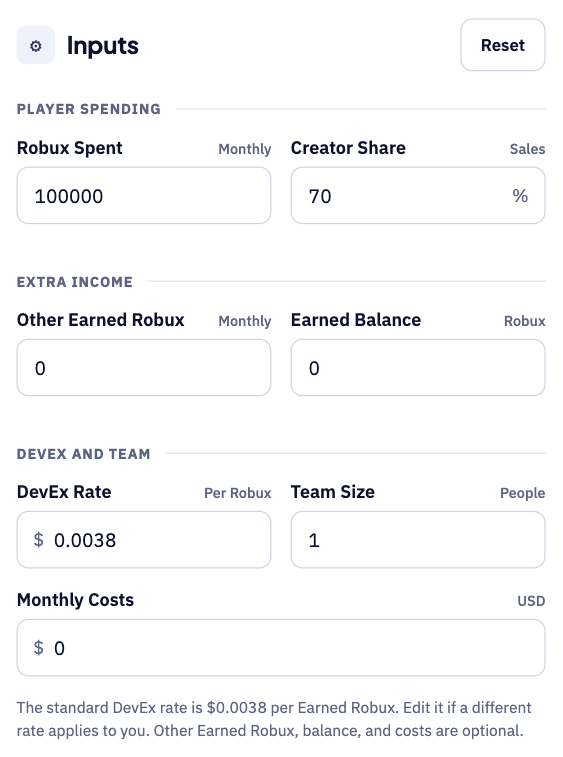
Start with the Robux players spent in your experience each month. Then add your creator share, any other earned Robux and your DevEx rate. Set your team size and monthly costs to see a fair per-person figure.
Step 2: Read your estimated DevEx value
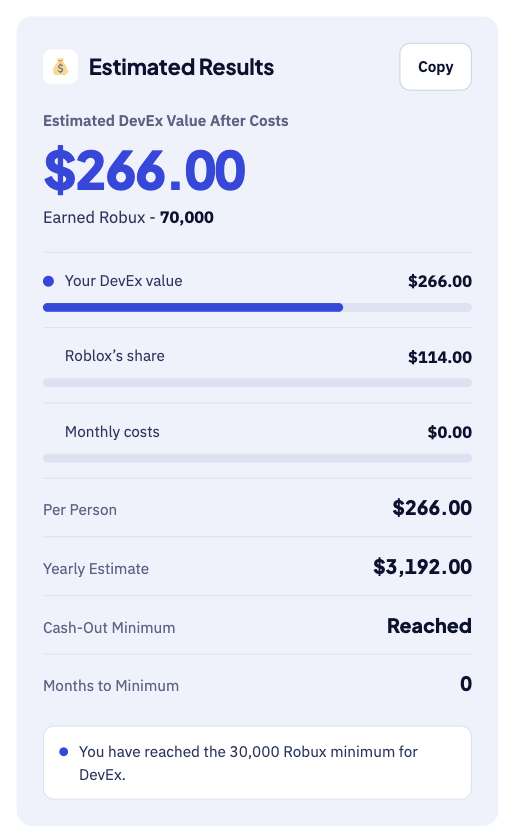
The large number shows your DevEx value in dollars after costs. Below it, the tool shows your yearly estimate and whether you reached the cash-out minimum. For instance, 100,000 Robux spent gives about $266 at the default rate.
Step 3: Check the breakdown table
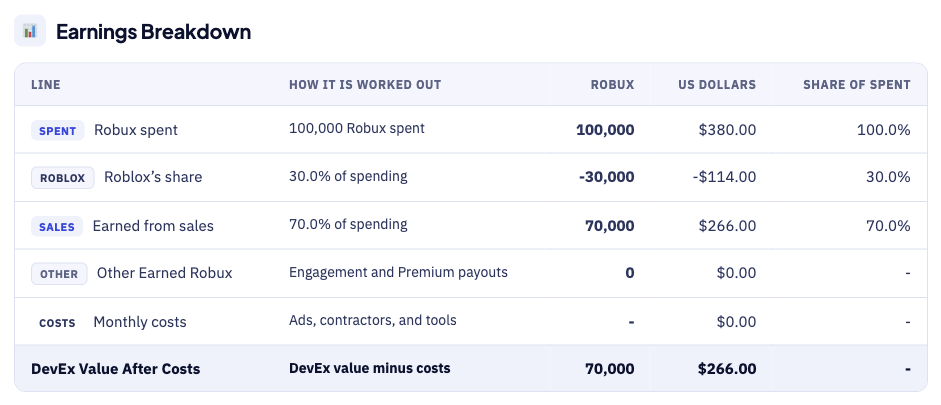
The breakdown table shows how each figure is worked out. For example, Roblox keeps 30% of spending, which is 30,000 Robux. Each row shows the sum behind the number, so errors are easy to spot.
How the Roblox Game Revenue Calculator Works
The calculator goes from Robux spent to dollars in five steps.
- First, enter the total Robux players spend in your experience monthly.
- Next, set your creator share, which Roblox generally states as 70%.
- Then, add any other Earned Robux, such as engagement-based payouts.
- After that, the tool converts Earned Robux to dollars at your DevEx rate.
- Finally, it subtracts costs, splits the result by team size, and checks the minimum.
Roblox Game Revenue Calculator Inputs
Each input does a different job, as the table shows.
| Input | Meaning | Why It Matters |
|---|---|---|
| Robux spent | Total Robux players spend per month | Sets your income base |
| Creator share | Share creators keep from sales | Roblox generally states 70% |
| Other Earned Robux | Engagement-based and Premium payouts | Adds income beyond sales |
| Earned Robux balance | Earned Robux you already hold | Checks the cash-out minimum |
| DevEx rate | US dollars per Earned Robux | Standard rate is $0.0038 |
| Team size | People sharing the revenue | Splits earnings evenly |
| Monthly costs | Ads, contractors, and tools | Shows value after costs |
First, Robux spent sets the size of your income base. However, the creator share matters just as much as the spending. For example, marketplace items and in-experience sales can pay different shares.
Next, the DevEx rate turns Earned Robux into US dollars. For that reason, update the rate field if Roblox changes it. Team size and costs show what each person really keeps.
Roblox Revenue Formula
The Roblox revenue formula follows the order in which Robux become dollars.
The diagram below shows each formula step in the right order.
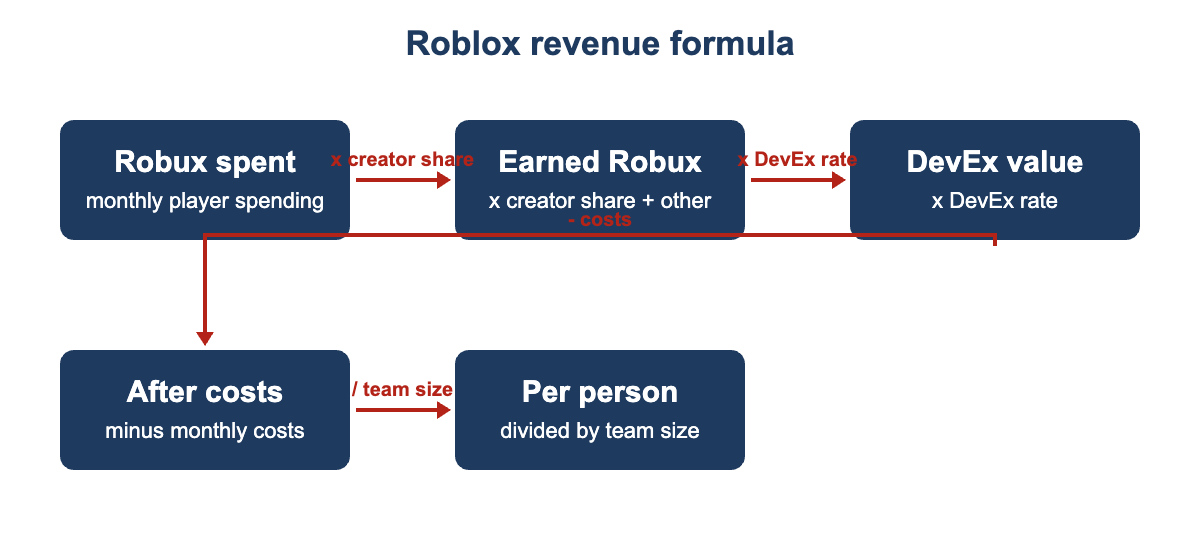
- First, Robux kept by Roblox equals Robux spent times the remaining percentage.
- Next, Earned Robux equal Robux spent times the creator share, plus other Earned Robux.
- Then, DevEx value equals Earned Robux multiplied by the DevEx rate.
- After that, value after costs equals DevEx value minus your monthly costs.
- Per-person value equals value after costs divided by team size.
- Finally, yearly estimate equals value after costs multiplied by twelve months.
DevEx Requirements at a Glance
Roblox lists several requirements before you can cash out through DevEx.
| Requirement | What Roblox Lists |
|---|---|
| Minimum to cash out | 30,000 Earned Robux |
| Age | At least 13 |
| Account | Verified email and DevEx portal account |
| Tax form | W-9 (US residents) or W-8 (non-US residents) |
| Frequency | One request per calendar month |
| Processing | About 10 business days for first-timers, about 5 for returning participants |
However, rules can change, so check the official DevEx page before applying. A paid Premium subscription is not required to use DevEx.
Roblox Game Revenue Calculator Example
Suppose players spend 100,000 Robux in your experience in one month. This example uses the default 70% creator share, with no other earnings or costs.
- Earned Robux come to 70,000 Robux after Roblox takes its share.
- Then, the Robux kept by Roblox come to 30,000 Robux in total.
- Next, the DevEx value at $0.0038 per Robux is $266.00.
- As a result, the yearly estimate at that pace is $3,192.
- Finally, the 30,000 Robux minimum is reached, so you can cash out.
Now try adding a team size and monthly costs to the example. For instance, three people sharing that revenue after $50 of costs get $72 each. Therefore, always check the per-person figure, not only the headline number.
What Changes Your Real Roblox Earnings
Your real Roblox earnings can differ from the estimate for several reasons.
- Different products pay different shares, so edit the creator share field.
- Engagement-based and Premium payouts add Earned Robux on top of sales.
- Roblox can change the DevEx rate, so update the rate field.
- Updates, events, and seasonal traffic can swing monthly spending sharply.
- Finally, your country decides what tax you owe on payouts.
Roblox Game Revenue Calculator Estimates vs Actual Earnings
Your Roblox Creator Dashboard will rarely match the estimate exactly. A few known factors explain most of the difference. For instance, a popular update can lift one month sharply.
| Item | Calculator Estimate | Real Dashboard |
|---|---|---|
| Robux spent | One monthly total you enter | Changes with events, updates, and seasons |
| Creator share | Entered as one percentage | Can differ by item type and platform |
| DevEx rate | Standard rate you enter | Roblox can change the rate over time |
| Timing | Instant result | Cash-out requests take time to process |
Therefore, check the current DevEx rate on Roblox before each cash-out. Compare the tool with your dashboard figures every month. Finally, keep a short log of monthly differences to improve future estimates.
Small audiences can swing sharply from one month to the next, so compare the same months across different years to spot seasonal patterns.
Common Roblox Revenue Calculator Mistakes
Small errors add up, so avoid these common mistakes.
- Never mix up Robux you buy with Earned Robux.
- Avoid using the headline total when a team splits the income.
- Remember that the creator share can differ by product type.
- Include monthly costs such as ads, contractors, and tools.
- Never assume one strong month will repeat every month.
- Do not forget taxes and bank fees on the payout.
Tips for Better Roblox Earnings Estimates
A few habits keep your Roblox estimates close to reality.
- Use your real monthly Robux spending from your Creator Hub.
- Test a cautious month using half of your usual spending.
- Test an optimistic month after a big update or event.
- Enter your team size before you promise anyone a payout.
- Recheck the current DevEx rate before each cash-out request you make.
Limits of the Roblox Game Revenue Calculator
No calculator can predict the exact Robux income for any experience. It uses the spending numbers you enter, not live Roblox data, and it cannot know which of your products pay which creator share.
It also ignores taxes, bank fees, and the timing of your payout. Compare estimates with your real DevEx payouts each month.
Related Calculators
Roblox is only one of several places to earn from games.
- Try our Mobile Game Revenue Calculator for ads and in-app purchases.
- PC developers can use the Steam Revenue Calculator for game sales.
- App makers can try the AdMob Revenue Calculator for ad income.
Roblox Game Revenue Calculator FAQs
How much is 100,000 Robux worth?
For example, at the standard DevEx rate, 100,000 Earned Robux is worth about $380. Roblox lists that rate as 10,000 Earned Robux for $38 in total. Note that DevEx applies to Earned Robux, not Robux you buy.
What is the minimum to cash out?
First, you need at least 30,000 Earned Robux to submit a DevEx request. Then, at the standard rate of $0.0038, that minimum is about $114.
Does Roblox take a cut of my experience earnings?
Yes, Roblox states that creators generally earn 70% of in-experience Robux sales. The rest covers app store fees, payment fees, hosting, moderation, support, and other platform costs. The creator share field lets you change this if your situation differs.
How often can I cash out?
First, Roblox allows creators to submit one DevEx request per calendar month. Review typically takes around 10 business days for first-time participants. However, returning participants typically wait around five business days for review.
Who can use DevEx?
First, you must be at least 13 and have a verified email. You also need the Earned Robux minimum and a W-9 or W-8 tax form. You must follow Roblox’s Terms of Use and Community Standards.
Is this the amount I will receive in my bank?
No, it is an estimate of the DevEx value before your income tax. However, payment timing, bank fees, and taxes in your country can change your final amount.
Conclusion
The Roblox game revenue calculator turns player spending into a clear DevEx estimate. Use it to plan cash-outs, compare scenarios, and split team income fairly, then confirm the current DevEx rules on the official Roblox pages.
Figures come from the Roblox Creator Hub pages on Developer Exchange and earning on Roblox. We last checked these figures and sources on September 30, 2026. This tool gives estimates only, so see our Disclaimer and Tools Policy.
More Revenue Calculators to Try
Pick another calculator to compare income across different platforms and revenue sources.