
Use this mobile game revenue calculator to estimate profit from purchases, ads, and store fees.
Live EstimatorMobile Game Revenue Calculator
Inputs
Audience and purchases
Advertising
Fees and costs
Estimated Results
Revenue Breakdown
| Line | How It Is Worked Out | Monthly | Yearly | Share of Revenue |
|---|---|---|---|---|
| IAP In-app purchases | ||||
| ADS Ad revenue | ||||
| FEE App store fee | ||||
| COSTS Monthly costs | ||||
| Monthly Profit |
Audience Scenarios
This table scales daily active users only. Payer share, spend, and eCPM stay fixed.
| Scenario | Daily Users | Net Revenue | Monthly Profit | Yearly Profit |
|---|
This tool gives estimates only. See our Disclaimer and Tools Policy.
On this page
- Mobile Game Revenue Calculator Overview
- What Is a Mobile Game Revenue Calculator?
- Who Should Use the Mobile Game Revenue Calculator?
- How to Use the Mobile Game Revenue Calculator Step by Step
- How the Mobile Game Revenue Calculator Works
- Mobile Game Revenue Calculator Inputs
- Mobile Game Revenue Formula
- App Store Fee Programs at a Glance
- Mobile Game Revenue Calculator Example
- What Changes Your Real Mobile Game Revenue
- ARPDAU and ARPPU Explained
- Mobile Game Revenue Calculator Estimates vs Actual Profit
- Common Mobile Game Revenue Calculator Mistakes
- Tips for Better Mobile Game Estimates
- Limits of the Mobile Game Revenue Calculator
- Related Calculators
- Mobile Game Revenue Calculator FAQs
- Conclusion
- More Revenue Calculators to Try
The mobile game revenue calculator is a free tool that estimates monthly profit from in-app purchases and ads. It takes the app store fee off purchase revenue, adds your ad income and then subtracts your monthly costs. The store fee applies to purchases only, never to ad revenue.
The tool also shows how many daily users your game needs to break even. Every result is an estimate, not a promise.
Mobile Game Revenue Calculator Overview
| Category | Details |
|---|---|
| Calculator Type | Mobile game revenue and profit estimator |
| Main Purpose | Combine purchase and ad income after store fees |
| Main Inputs | Daily users, payer share, spend, ads per user, eCPM, fee, costs |
| Main Output | Net revenue, profit, yearly profit, break-even users |
| Extra Check | Daily users needed to cover costs |
| Currency | US dollars |
| Accuracy | Estimate only; varies by country, format, and program |
| Best For | Indie developers and small studios |
What Is a Mobile Game Revenue Calculator?
A mobile game revenue calculator combines income from purchases and ads into one estimate. Then it subtracts app store fees on purchases and your running costs. Therefore, you see real monthly profit, not just headline revenue.
Most mobile games earn from in-app purchases, advertising, subscriptions, or a mix. This calculator models purchases and ads, the two most common streams for free-to-play games. However, it does not model subscription income or other revenue streams.
Who Should Use the Mobile Game Revenue Calculator?
People use it for different planning goals.
- Indie developers can test whether a launch plan can pay its costs.
- Small studios can judge whether a level of daily users is enough.
- Designers can test how pricing changes payer share and monthly spend.
- Finally, marketers can set a daily user target before buying installs.
How to Use the Mobile Game Revenue Calculator Step by Step
Using the mobile game revenue calculator takes three steps: enter your numbers, read the results, then check the table to see how each figure is worked out.
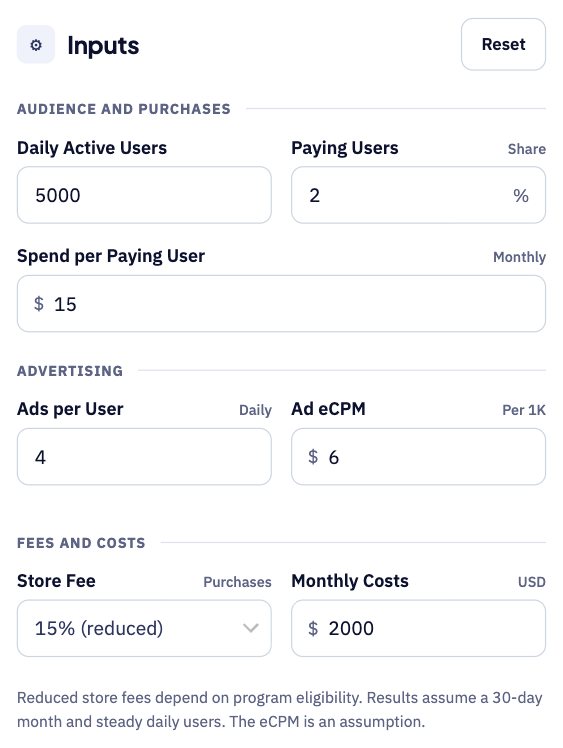
Step 1: Enter your players, purchases and ads
Start with your daily active users and the share of them who pay. Add what each payer spends, plus ads per user and your ad eCPM, then choose your store fee and enter your monthly costs.
Step 2: Read your monthly profit
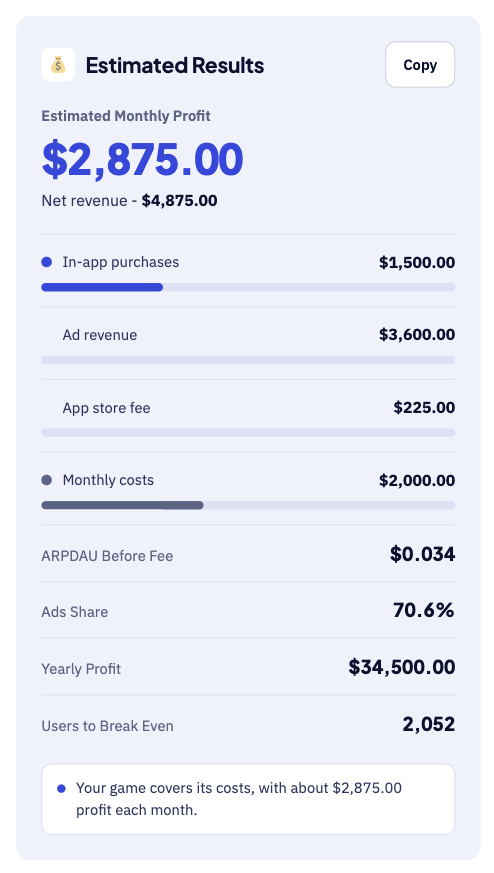
The big number is your estimated monthly profit after fees and costs. Underneath, you see in-app purchases, ad revenue, store fees and break-even users. For instance, 5,000 players give about $2,875 profit each month.
Step 3: Check the breakdown table
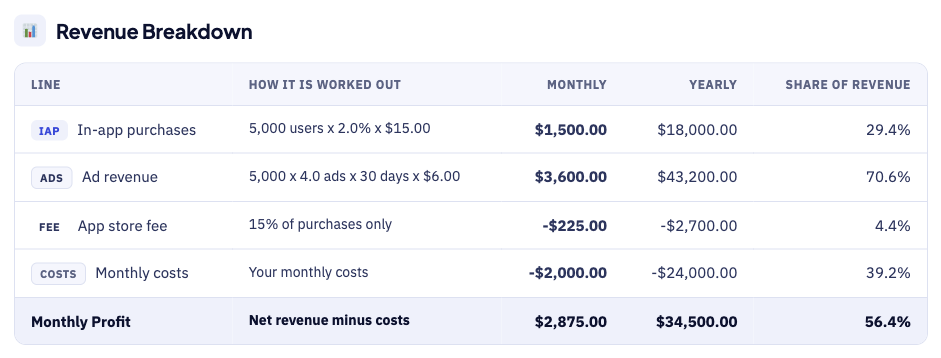
The breakdown table shows how each figure is worked out. For example, 5,000 users, 2% paying and $15 spend give $1,500 in purchases. Each row shows the sum behind the number, so errors are easy to spot.
How the Mobile Game Revenue Calculator Works
The calculator goes from daily users to profit in five steps.
- First, enter your daily active users and the share who pay.
- Next, add the average monthly spend for each paying user.
- Then, enter ad impressions per user and your ad eCPM.
- After that, choose the store fee, which applies to purchases only.
- Finally, add monthly costs to see profit and break-even daily users.
Mobile Game Revenue Calculator Inputs
Each input does a different job, as the table shows.
| Input | Meaning | Why It Matters |
|---|---|---|
| Daily active users | Average players per day | Sets your audience size |
| Paying users | Share of daily users who buy in a month | Drives purchase revenue |
| Spend per paying user | Average monthly in-app purchase spend | Sets the value of each payer |
| Ad impressions per user | Interstitial, rewarded, and banner views each day | Drives ad volume |
| Ad eCPM | Earnings per 1,000 ad impressions | Varies by country and format |
| App store fee | 15% or 30% on purchases | Ads are not subject to the fee |
| Monthly costs | User acquisition, servers, and team | Shows profit after costs |
First, daily users and payer share set the size of your purchase revenue. However, a small change in payer share has a large effect. For example, moving payers from 2% to 3% lifts purchase revenue by 50%.
Next, ad impressions and eCPM set your ad revenue each month. For that reason, use the eCPM shown in your ad network dashboard. The default eCPM in this tool is only a placeholder assumption.
Mobile Game Revenue Formula
The mobile game revenue formula adds purchases and ads, then removes fees and costs.
The diagram below shows each formula step in the right order.
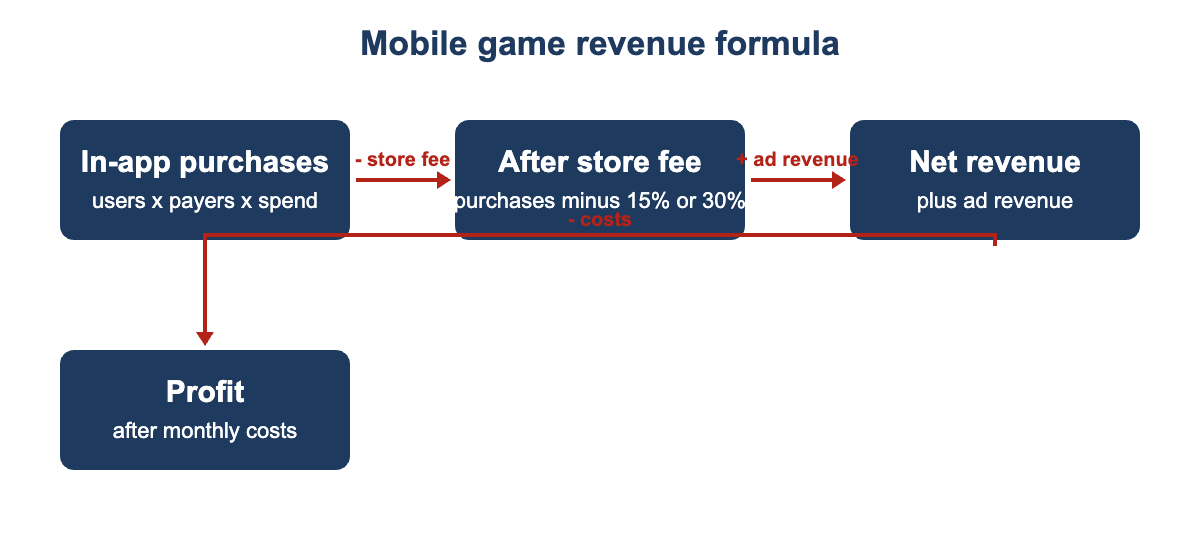
- First, in-app purchase revenue equals daily users times payer share times monthly spend.
- Next, impressions per month equal daily users times ads per user times 30 days.
- Then, ad revenue equals impressions per month multiplied by eCPM, divided by 1,000.
- After that, the app store fee equals purchase revenue times 15% or 30%.
- Net revenue equals purchases after the fee, plus ad revenue.
- Finally, profit equals net revenue minus all of your monthly costs.
App Store Fee Programs at a Glance
Apple and Google both offer a 15% commission for eligible small developers.
| Store | Reduced Rate | Who Qualifies | Above the Threshold |
|---|---|---|---|
| Apple App Store | 15% | Developers with under $1 million in proceeds in the previous calendar year, after enrolling in the Small Business Program | Standard 30% for the rest of the year |
| Google Play | 15% | First $1 million of annual revenue per developer account group | Standard 30% on revenue above $1 million |
Both programs cover paid apps, in-app purchases, and subscriptions alike. However, advertising revenue is not part of the store commission. Therefore, check that your account qualifies before you assume the 15% rate.
Mobile Game Revenue Calculator Example
Suppose your game has 5,000 daily active users, and 2% of them spend $15 monthly. Players see four ads a day at a $6 eCPM. Finally, you pay the 15% store fee, and monthly costs are $2,000.
- First, in-app purchase revenue comes to $1,500 per month in total.
- Next, ad revenue comes to $3,600, which is the largest part.
- Then, the app store fee on purchases only comes to $225.00.
- As a result, net revenue is $4,875 before your monthly costs.
- After $2,000 of monthly costs, your profit is $2,875 per month.
- Ads make up 70.6% of total revenue in this scenario.
- Finally, you need 2,052 daily users to cover your costs.
Next, change one input at a time to see what matters most. For instance, small changes to payer share or eCPM often beat big install gains.
What Changes Your Real Mobile Game Revenue
Your real revenue can differ from the estimate for several reasons.
- First, retention matters, because daily users result from installs and retention.
- Next, country mix changes both purchase spending and ad eCPMs a lot.
- Rewarded video usually earns more per view than banners do.
- However, showing too many ads can hurt retention and future revenue.
- Then, a small change in payer share has a large purchase effect.
- Finally, events and updates create spikes, so model a cautious month too.
ARPDAU and ARPPU Explained
First, ARPDAU is average revenue per daily active user, while ARPPU is per payer. Then, ARPDAU shows how well you monetise everyone who plays your game. In contrast, ARPPU shows how much your paying players spend.
This calculator uses spend per payer and ad impressions to work out ARPDAU for you. Therefore, you do not need to enter your ARPDAU figure yourself.
Mobile Game Revenue Calculator Estimates vs Actual Profit
Your store reports and ad dashboards will differ from the estimate. However, a few known factors explain most of the gap.
| Item | Calculator Estimate | Real Report |
|---|---|---|
| Ad revenue | One ARPDAU value you enter | Changes with country, placement, and season |
| Store fee | One percentage you pick | Reduced rates may apply to smaller developers |
| Users | Steady daily active users | Players leave, so numbers rise and fall |
| Costs | Fixed monthly costs | Marketing spend often changes each month |
Therefore, update your inputs each month using real analytics data. Then compare your profit against the break-even point shown in the tool.
Common Mobile Game Revenue Calculator Mistakes
Small errors add up, so avoid these common mistakes.
- Never apply the store fee to ad revenue in your estimate.
- Avoid assuming the 15% rate before confirming your program eligibility.
- Remember that eCPM varies by country, ad format, network, and season.
- Do not confuse total installs with your daily active users.
- Never assume one strong month will repeat every month.
- Remember that the profit shown here is before any income tax.
Tips for Better Mobile Game Estimates
A few habits keep your mobile game estimates close to reality.
- Use real payer share and spend from your store reports.
- Replace the default eCPM with your ad network dashboard figure.
- Test a low case with lower retention and fewer daily users.
- Compare the break-even daily users against your current audience.
- Update the inputs each month as your game grows.
Limits of the Mobile Game Revenue Calculator
No calculator can predict the exact revenue for any mobile game. It uses the eCPM you enter, not live auction data, and it assumes a 30-day month and steady daily users.
It also ignores subscriptions, refunds, taxes, and currency changes in payouts. Compare estimates with your real store and ad reports monthly.
Related Calculators
Mobile games can also earn from other platforms and ad networks.
- Try our AdMob Revenue Calculator for ad-only income.
- PC developers can use the Steam Revenue Calculator for game sales.
- Creators can try the Roblox Game Revenue Calculator for Robux income.
Mobile Game Revenue Calculator FAQs
How do mobile games make money?
Most mobile games earn from in-app purchases, advertising, subscriptions, or a mix. First, this calculator models purchases and ads, the two most common streams. Therefore, add subscription income separately if your game also offers it.
What are ARPDAU and ARPPU?
ARPDAU is average revenue per daily active user, and ARPPU is per paying user. This calculator works out ARPDAU for you from spend and ad impressions. ARPDAU shows how well you monetise all of your players.
How much does the app store take?
Apple and Google both offer a 15% commission for eligible small developers. However, Apple requires enrollment, and Google Play applies 15% only to the first $1 million. Ad revenue is not subject to the store commission at all.
What eCPM should I use?
First, ad eCPM depends on country, ad format, network, and season. Therefore, there is no single correct number for every game. Instead, replace the placeholder default with the eCPM from your dashboard.
Why does the calculator show daily users needed to cover costs?
First, it divides your monthly costs by the net revenue each daily user brings in. As a result, you get a rough audience target for break-even. That target helps a lot when you plan your user acquisition spending.
Does this include taxes?
No, the profit shown is before income tax and local obligations. However, talk to a qualified accountant about your own situation.
Conclusion
The mobile game revenue calculator turns players, purchases, and ads into monthly profit. Use it to plan pricing, test scenarios, and set user targets, then check the results against your real store reports.
Store program details come from Apple and Google small business program descriptions. Always confirm current terms in the Apple Developer and Google Play Console documentation. We last checked these details and sources on September 30, 2026.
This tool gives estimates only, so see our Disclaimer and Tools Policy.
More Revenue Calculators to Try
Pick another calculator to compare income across different platforms and revenue sources.