
Use this Steam revenue calculator to estimate earnings after refunds, tax, and Steam’s cut.
Live EstimatorSteam Revenue Calculator
Inputs
Sales
Deductions
Partners and costs
Estimated Results
Revenue Breakdown
| Line | How It Is Worked Out | Amount | Per Copy | Share of Gross |
|---|---|---|---|---|
| GROSS Gross sales | ||||
| REFUND Refunds | ||||
| TAX Sales tax or VAT | ||||
| STEAM Steam’s cut | ||||
| PARTNER Publisher share | ||||
| Your Take-Home |
Sales Scenarios
This table scales copies sold only. Price, tax, and rates stay fixed.
| Scenario | Copies Sold | Net Revenue | Take-Home | Profit |
|---|
This tool gives estimates only. See our Disclaimer and Tools Policy.
On this page
- Steam Revenue Calculator Overview
- What Is a Steam Revenue Calculator?
- Who Should Use the Steam Revenue Calculator?
- How to Use the Steam Revenue Calculator Step by Step
- How the Steam Revenue Calculator Works
- Steam Revenue Calculator Inputs
- Steam Revenue Formula
- Steam Revenue Share Tiers
- Steam Revenue Calculator Example
- What Changes Your Real Steam Payout
- How Steam Payments Work
- Steam Revenue Calculator Estimates vs Actual Payouts
- Common Steam Revenue Calculator Mistakes
- Tips for Better Steam Revenue Estimates
- Limits of the Steam Revenue Calculator
- Related Calculators
- Steam Revenue Calculator FAQs
- Conclusion
- More Revenue Calculators to Try
The Steam revenue calculator is a free tool that shows how much your game keeps after Steam’s share. It takes your price and copies sold, removes refunds and tax, then applies Steam’s tiered cut of 30%, 25% and 20%. For nearly every indie game, the 30% band is the one that matters.
The tool also shows profit and the copies you need to break even. Every result is an estimate, not a promise.
Steam Revenue Calculator Overview
| Category | Details |
|---|---|
| Best for | Indie developers, publishers, and game investors |
| Inputs | Price, copies, discount, refunds, tax, publisher share, costs |
| Outputs | Net revenue, Steam’s cut, take-home, profit, break-even copies |
| Cost | Free, with no signup |
| Last checked | September 30, 2026 |
What Is a Steam Revenue Calculator?
A Steam revenue calculator estimates what a developer keeps from game sales on Steam. In practice, sticker price and real income differ by a wide margin. For example, refunds, tax, and Steam’s share all reduce the money you receive.
Indie developers use it to plan launches before spending on marketing. Publishers use it to compare deals and set realistic sales targets. Therefore, the result works best as a planning tool, not a forecast.
Who Should Use the Steam Revenue Calculator?
People use it for different planning goals.
- Solo developers can judge whether a game can repay its costs.
- Publishers can compare revenue splits before they sign any deal.
- Investors can sanity check sales claims from studios they consider backing.
- Finally, students can learn how platform fees shape a game’s income.
How to Use the Steam Revenue Calculator Step by Step
Using the Steam revenue calculator takes three steps: enter your numbers, read the results, then check the table to see how each figure is worked out.
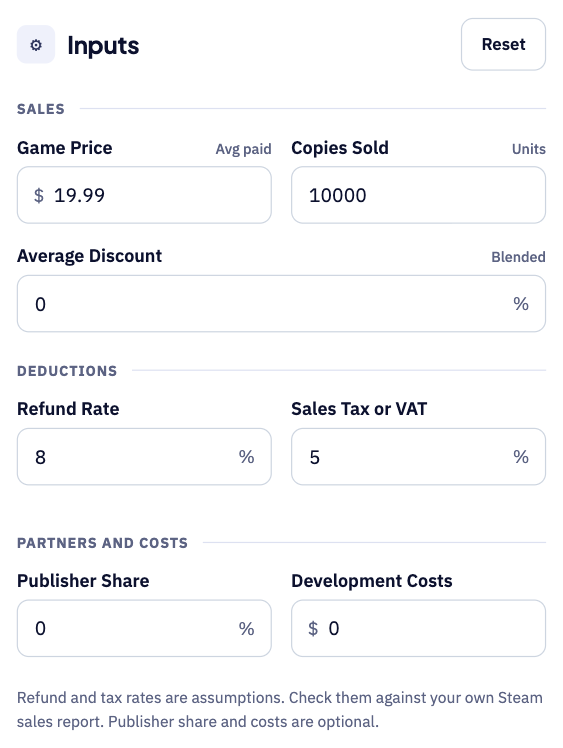
Step 1: Enter your price, sales and deductions
Start with your game price and the number of copies you sold. Add your average discount, refund rate and sales tax or VAT, then enter any publisher share and development costs if they apply.
Step 2: Read your estimated take-home
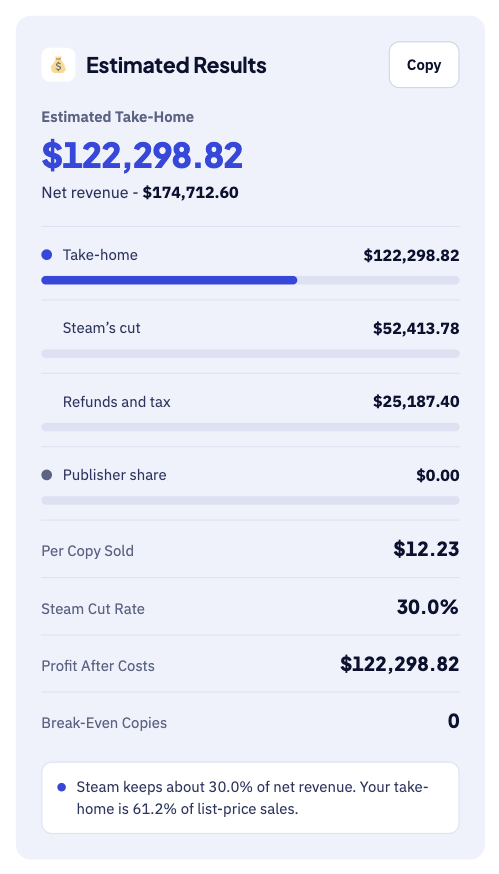
The large number shows what you keep after Steam, refunds and tax. Below it, you see Steam’s cut, your per-copy income and break-even copies. For instance, 10,000 copies at $19.99 leave about $122,299 after deductions.
Step 3: Check the breakdown table
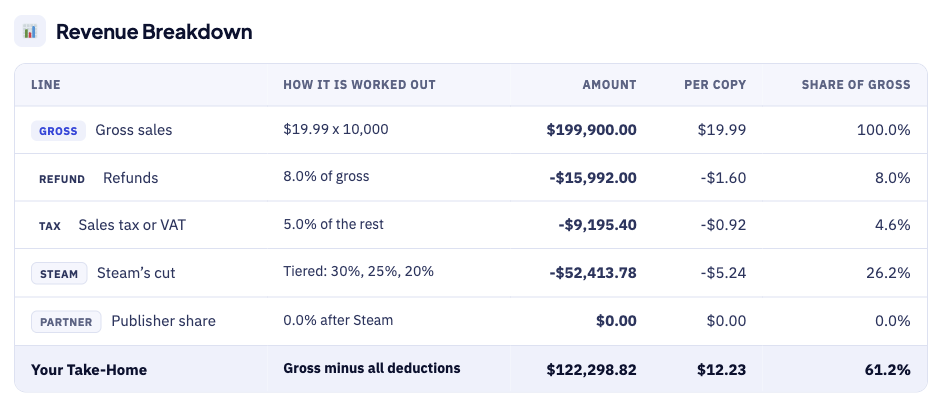
The breakdown table shows how each figure is worked out. For example, Steam’s cut uses tiers of 30%, 25% and 20%. Each row shows the sum behind the number, so errors are easy to spot.
How the Steam Revenue Calculator Works
The calculator follows the same order in which money leaves each sale. First, enter your game price, copies sold, and average discount.
- First, gross sales equal the discounted price multiplied by copies sold.
- Next, refunds remove the share of sales that players return.
- Then, sales tax or VAT comes off, which leaves net revenue.
- After that, Steam takes a percentage of net revenue using its tier bands.
- If you have a publisher, their share comes off what remains.
- Finally, what remains is your take-home, before your own income tax.
Lastly, add your costs to see profit and break-even copies. You can test several sales scenarios in just seconds.
Steam Revenue Calculator Inputs
Each input controls one step of the calculation shown above, so enter it carefully.
| Input | What to enter | Tip |
|---|---|---|
| Game price | Average price per copy | Use your list price |
| Copies sold | Total units in the period | Try cautious, realistic, and optimistic cases |
| Average discount | Blended across sales and bundles | Lowers your average price per copy |
| Refund rate | Share of sales refunded | Default 8%, an adjustable assumption |
| Sales tax or VAT | Blended tax portion of the price | Default 5%, an adjustable assumption |
| Publisher share | Optional percentage | Use 0 if you self-publish |
| Costs | Development and marketing | Used for profit and break-even |
Refund and tax values are assumptions, so replace them with real data. Your Steam sales report shows net figures after returns and chargebacks.
Steam Revenue Formula
The Steam revenue formula follows the order of each deduction. The diagram below shows each step from gross sales to take-home.
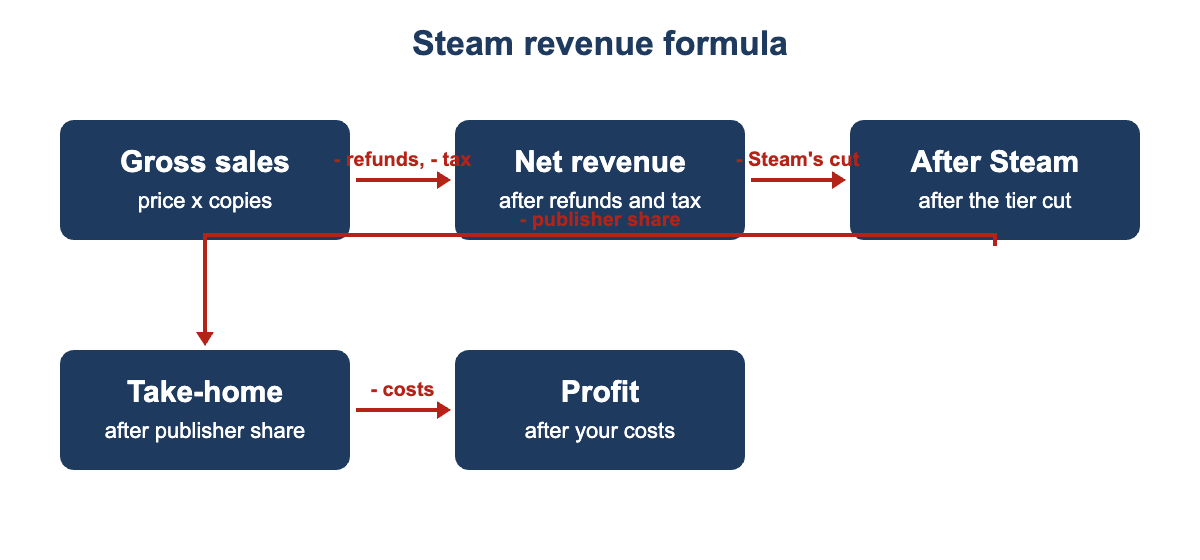
- Gross sales equal the price after discount times the copies sold.
- Next, net revenue equals gross sales minus refunds and sales tax.
- Then, Steam’s cut equals net revenue times the tier rate for that band.
- After that, take-home equals revenue after Steam minus any partner share.
- Finally, profit equals your take-home minus all development and marketing costs.
- Lastly, break-even copies equal costs divided by take-home per copy sold.
Steam Revenue Share Tiers
Steam’s share drops as a game earns more over its lifetime. These thresholds apply to lifetime revenue per game, from October 1, 2018.
| Lifetime net revenue of the game | Steam’s share | Your share |
|---|---|---|
| Up to $10 million | 30% | 70% |
| $10 million to $50 million | 25% | 75% |
| Above $50 million | 20% | 80% |
However, each lower rate applies only to revenue above its threshold. Therefore, the calculator applies these rates in separate bands, not one flat rate. For nearly every indie game, the 30% band is the one that matters.
Steam Revenue Calculator Example
For example, suppose you sell a game at $19.99 and move 10,000 copies. This example uses no discount, with the default 8% refund and 5% tax.
- First, gross sales reach $199,900 before Steam or anyone else takes a share.
- Then, refunds at 8% remove about $15,992, which leaves roughly $183,908.
- Next, sales tax at 5% removes about $9,195, leaving net revenue near $174,713.
- After that, Steam’s 30% cut takes about $52,414 from net revenue.
- As a result, your revenue after Steam is about $122,299, or $12.23 per copy.
So a $19.99 game keeps about 61% of its sticker price here. If a publisher took 20% of that amount, your take-home would fall to about $97,839.
What Changes Your Real Steam Payout
Your real payout can differ from the estimate for several reasons.
- Regional pricing means players in different countries pay different prices.
- Sales and bundles lower your average price per copy sold.
- Refunds and chargebacks vary by genre, so check your own sales report.
- Publisher and studio splits are private deals and can differ from this tool.
- Finally, your own income taxes depend on your country and business structure.
How Steam Payments Work
Steam pays developers monthly, by the 30th of the following month. In addition, payments arrive in US dollars once your balance passes the $100 minimum.
Steam charges a $100 Direct fee once for each product. However, Steam returns it after the product reaches $1,000 in adjusted gross revenue. Therefore, add the fee to your costs if you want it in break-even.
Steam Revenue Calculator Estimates vs Actual Payouts
Your Steamworks sales report will differ from the estimate in some ways. However, most of the differences come from a few known items.
| Item | Calculator Estimate | Real Report |
|---|---|---|
| Price | One list price you enter | Regional pricing changes the price in each country |
| Refunds | One refund percentage | Actual refunds vary by game and month |
| Taxes | Not fully modelled | Sales taxes and withholding can reduce the payout |
| Timing | Instant result | Payments follow after each sales period closes |
Therefore, use the result as a planning range for launch budgets. Compare it with your Steamworks sales report after launch.
Common Steam Revenue Calculator Mistakes
- Many developers forget that refunds and tax come off net revenue first.
- Others use the list price and ignore sale events and bundles.
- Some assume Steam always takes 30% and miss the lower tiers at scale.
- Many people treat take-home as profit and skip development costs.
Tips for Better Steam Revenue Estimates
These habits make your estimates more useful and more honest.
- Start with wishlist data to estimate realistic first-month launch sales.
- Model a low case using half your expected copies sold.
- Then lower your average price to reflect launch discounts and sales.
- Also keep a cost buffer, because marketing spend often grows after launch.
- Compare break-even copies against what similar games have realistically sold.
Limits of the Steam Revenue Calculator
The calculator gives estimates only, so real payouts will differ. It cannot predict how many copies your game will actually sell.
Instead, use it to compare cautious, realistic, and optimistic scenarios. Once your game is live, replace assumptions with figures from your sales report.
Related Calculators
These related tools cover other game platforms and income types.
- Try the Mobile Game Revenue Calculator for ad and in-app income.
- Use the Roblox Game Revenue Calculator to estimate Robux earnings and cash-out value.
- Read the AdMob Revenue Calculator guide to estimate ad income per app.
Steam Revenue Calculator FAQs
How much does Steam take from each sale?
Steam takes 30% of net revenue until a game passes $10 million lifetime. The rate then drops to 25% up to $50 million, then 20%. These tiers apply per game and count DLC, in-game sales, and Market fees.
Does the Steam revenue calculator include sales tax and VAT?
Yes, it uses a blended sales tax or VAT field. Steam handles tax collection, and its share applies to net revenue. Therefore, replace the 5% default with a figure from your own report.
What refund rate should I use?
Steam lets players request a refund within 14 days of purchase, so plan for returns. However, players must have played under two hours to qualify. Rates vary by genre, so treat the 8% default as adjustable.
When does Steam pay developers?
Valve pays monthly, by the 30th of the following month. Your balance must first pass the $100 minimum payout threshold. Finally, Valve sends payments in US dollars by bank transfer.
Is the $100 Steam Direct fee included?
No, the calculator does not include the $100 Steam Direct fee. Steam returns it in a payment after the product reaches $1,000 in adjusted gross revenue. Therefore, add it to your costs field for a fuller break-even figure.
Is the take-home figure the same as my income tax?
No, take-home is the amount before your own income tax. Your country, business structure, and tax treaties decide what you owe. Therefore, speak to a qualified accountant before making financial decisions.
Conclusion
The Steam revenue calculator turns a sticker price into a realistic take-home figure. Use it to test scenarios, compare deals, and also find your break-even point. Then update the inputs with real sales data after launch.
Tier rates, the Direct fee, and payment terms come from Steamworks documentation. Read the current Steam Direct page before making financial decisions.
We last checked these figures and sources on September 30, 2026. This tool gives estimates only, so see our Disclaimer and Tools Policy.
More Revenue Calculators to Try
Pick another calculator to compare income across different platforms and revenue sources.