
Use this AdMob revenue calculator to estimate earnings from users, impressions, and eCPM.
Live EstimatorAdMob Revenue Calculator
Inputs
Audience
Ad value
Real eCPM check
Estimated Results
Earnings Breakdown
| Line | How It Is Worked Out | Per Day | Per Period | Share |
|---|---|---|---|---|
| ADS Ad impressions | ||||
| GROSS Earnings before adjustment | ||||
| ADJ Adjustment | ||||
| Earnings After Adjustment |
User Growth Scenarios
This table scales daily active users only. Ads per user and eCPM stay fixed.
| Scenario | Daily Users | Daily Earnings | Monthly (30 Days) | Yearly |
|---|
This tool gives estimates only. See our Disclaimer and Tools Policy.
On this page
- AdMob Revenue Calculator Overview
- What Is an AdMob Revenue Calculator?
- Who Should Use the AdMob Revenue Calculator?
- How to Use the AdMob Revenue Calculator Step by Step
- How the AdMob Revenue Calculator Works
- AdMob Revenue Calculator Inputs
- AdMob Revenue Formula
- AdMob Revenue Calculator Example
- What Changes Your AdMob Earnings
- How AdMob Payments Work
- AdMob Revenue Calculator Estimates vs Actual Earnings
- Common AdMob Revenue Calculator Mistakes
- Tips for Better AdMob Estimates
- Limits of the AdMob Revenue Calculator
- Related Calculators
- AdMob Revenue Calculator FAQs
- Conclusion
- More Revenue Calculators to Try
The AdMob revenue calculator is a free tool that estimates how much your app can earn from ads. It multiplies daily users by ads per user to get impressions, then turns those impressions into earnings using your eCPM. eCPM is the hardest input to guess, so take it from your own AdMob reports.
It shows daily, monthly and yearly estimates, and it can work out your real eCPM from actual earnings. Every result is an estimate, not a promise.
AdMob Revenue Calculator Overview
| Category | Details |
|---|---|
| Calculator Type | Mobile app ad revenue estimator |
| Main Purpose | Estimate AdMob earnings from users and impressions |
| Main Inputs | Daily users, impressions per user, eCPM, days |
| Main Output | Daily, monthly, and yearly earnings |
| Extra Tool | Real eCPM from your actual numbers |
| Currency | US dollars |
| Accuracy | Estimate only; varies by format, country, and demand |
| Best For | App developers, publishers, and indie studios |
What Is an AdMob Revenue Calculator?
An AdMob revenue calculator is a free tool that estimates ad income for mobile apps. Because AdMob is Google’s ad platform, many app developers use it. The calculator replaces guesswork with simple and fast maths.
Developers often ask how much money their app will actually earn. For example, a new app owner can test ten scenarios in minutes. Then the result shows potential earnings before tax and other costs.
However, real income depends on ad format, country, and advertiser demand. Therefore, treat every figure as a planning guide, not a forecast.
Who Should Use the AdMob Revenue Calculator?
People use it for different planning goals.
- Indie developers can judge whether ads will cover costs.
- Publishers can compare apps and decide where to invest next.
- Product managers can test how more ads per user change income.
- Finally, marketers can estimate ad income before they buy new users.
How to Use the AdMob Revenue Calculator Step by Step
Using the AdMob revenue calculator takes three steps: enter your numbers, read the results, then check the table to see how each figure is worked out.
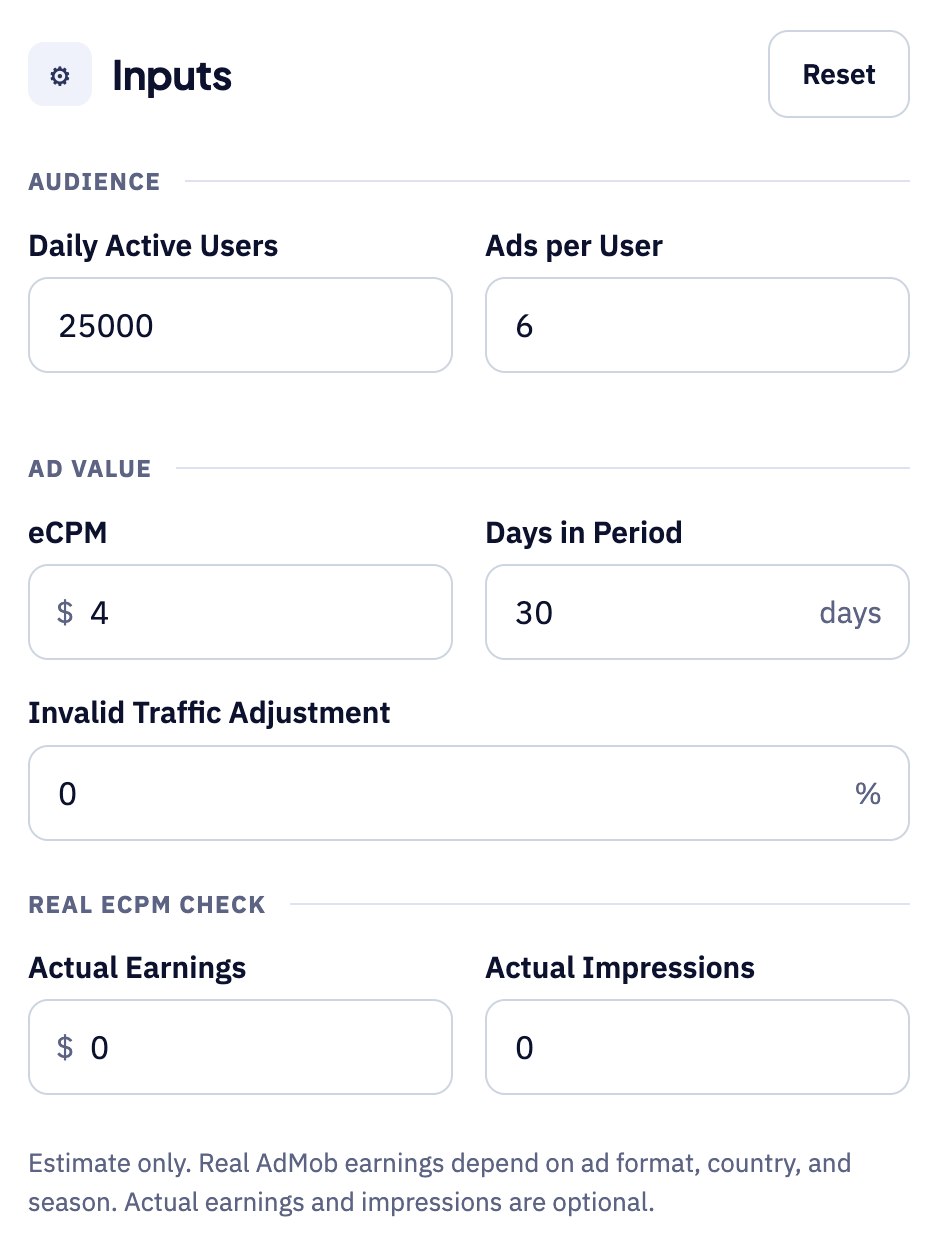
Step 1: Enter your audience and ad numbers
Start with your daily active users and the number of ads each user sees. Then add your eCPM, which is the amount you earn per 1,000 impressions. You can set invalid traffic and your real earnings to refine the estimate.
Step 2: Read the estimated earnings
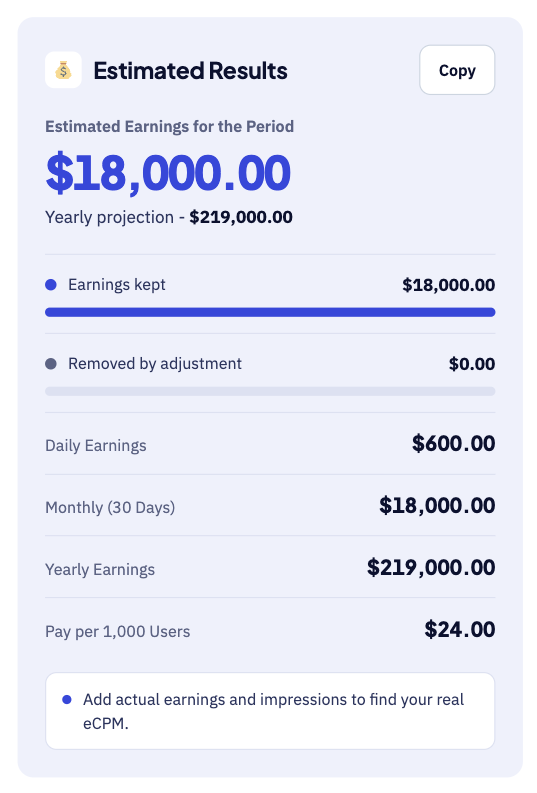
The large number shows your estimated earnings for the chosen period. Below it, you see daily, monthly and yearly earnings plus your pay per 1,000 users. For instance, 25,000 users and a $4 eCPM give about $18,000 a month.
Step 3: Check the breakdown table
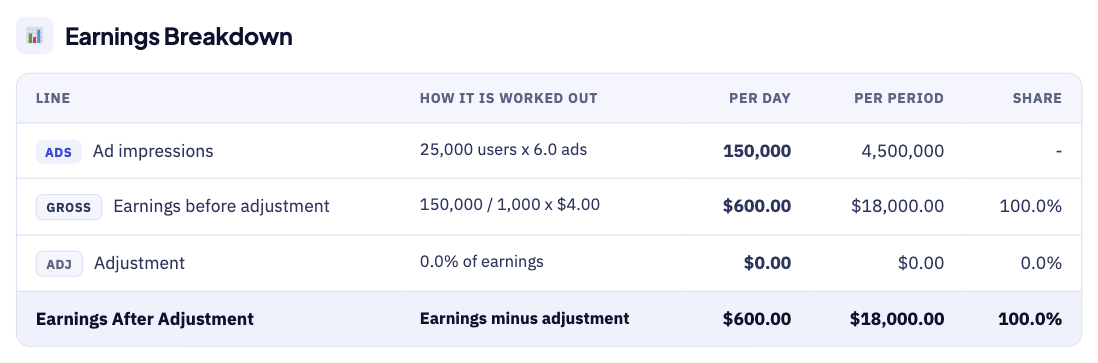
The breakdown table shows how each figure is worked out. For example, 25,000 users and 6 ads give 150,000 impressions each day. Each row shows the sum behind the number, so errors are easy to spot.
How the AdMob Revenue Calculator Works
The calculator goes from users to earnings in five steps.
- First, you enter your average daily active users for the app.
- Next, you add the ad impressions each user sees per day.
- Then, you enter your eCPM from your own AdMob reports.
- After that, the tool multiplies impressions by the days in the period.
- Finally, it converts those impressions into earnings using your eCPM value.
AdMob Revenue Calculator Inputs
Each input does a different job, as the table shows.
| Input | Meaning | Why It Matters |
|---|---|---|
| Daily active users | Average users per day | Sets your ad audience size |
| Impressions per user | Ads shown to each user daily | Drives total ad volume |
| eCPM | Earnings per 1,000 impressions | Sets the value of each ad |
| Days in period | Length of the estimate | Scales earnings up or down |
| Adjustment | Share removed for invalid traffic | Makes the estimate more cautious |
| Actual earnings | Optional real earnings figure | Helps find your true eCPM |
| Actual impressions | Optional real impression count | Pairs with actual earnings |
First, daily active users set the size of your audience. However, impressions per user often matter just as much as audience size. For example, more ads per session raise earnings, but they can hurt retention.
Next, consider your eCPM, which is the hardest input to guess. For that reason, use the figure from your AdMob reports. Country, ad format, and season all move your eCPM over time.
The adjustment field removes a share of earnings for invalid traffic. Therefore, a small adjustment makes your estimate more cautious and realistic.
AdMob Revenue Formula
The AdMob revenue formula has three parts that work together. First, it counts the total impressions across the whole period. Then it turns those impressions into earnings using your eCPM.
The diagram below shows each formula step in the right order.
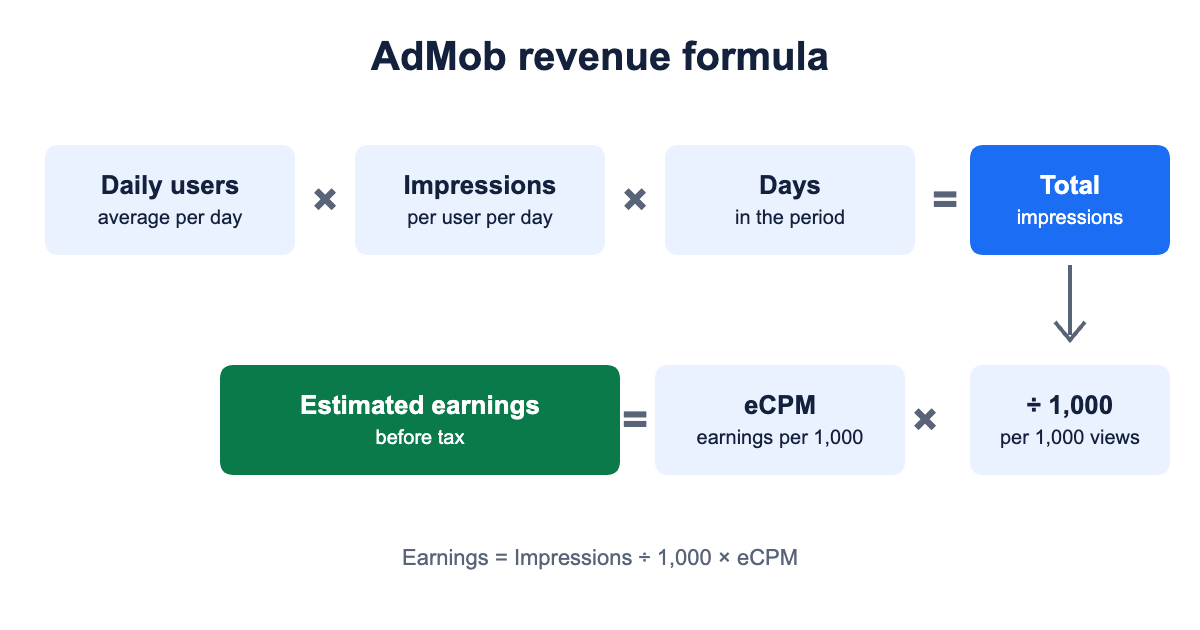
- Impressions equal daily users times impressions per user times days.
- Earnings equal total impressions multiplied by eCPM, then divided by 1,000.
- eCPM equals earnings divided by impressions, then multiplied by 1,000.
For example, 1,000,000 impressions at a $3 eCPM earn $3,000. As a result, doubling either impressions or eCPM doubles your earnings.
AdMob Revenue Calculator Example
This example uses round numbers to keep the maths simple. Here, an app has 10,000 daily users, and each user sees five ads. The eCPM is $3, and the period is 30 days.
| Calculation | Result |
|---|---|
| Impressions per day | 50,000 |
| Impressions in 30 days | 1,500,000 |
| Estimated earnings | $4,500 |
| Earnings per day | $150 |
| Earnings per 1,000 users per day | $15.00 |
| Yearly estimate at this pace | $54,750 |
Now add a 10% adjustment for invalid traffic to the same example. As a result, your earnings fall from $4,500 down to $4,050. Therefore, a cautious estimate gives you a safer and more realistic plan.
What Changes Your AdMob Earnings
Because many factors move your real AdMob income, adjust the inputs yourself. The calculator cannot see any of these outside factors directly.
| Factor | Effect |
|---|---|
| Ad format | Rewarded and interstitial ads often earn more than banners |
| Country | Users in some markets generate higher eCPM |
| Fill and demand | Ads only earn when AdMob serves them |
| Mediation | More networks can raise competition for each ad |
| Policy compliance | Invalid traffic can reduce or withhold earnings |
| Retention | Loyal users see more ads over time |
| Season | Advertiser demand shifts through the year |
First, test ad format, because it is the easiest lever. For instance, rewarded video gives users a reason to watch.
However, showing too many ads can push users away from your app. As a result, retention falls, and future impressions fall with it.
How AdMob Payments Work
AdMob pays developers once a month, following a fixed payment schedule. First, your earnings build up steadily during the whole month.
Then Google finalizes them around the 3rd of the next month. Finally, payment follows around the 21st if you meet the threshold.
| Step | What Happens |
|---|---|
| Earnings build | Throughout the month |
| Earnings finalized | Around the 3rd of the next month |
| Payment issued | Around the 21st, if you meet the threshold |
| Below the threshold | Earnings roll over to the next month |
| Arrival | EFT payments can take up to seven business days |
However, the payment threshold varies by location and account type. If you fall short, earnings roll over to the next month. EFT payments can take up to seven business days.
Before your first payment, you must finish five setup steps.
- First, verify your identity as the account holder with AdMob.
- Second, confirm your address and your payee name for payments.
- Third, choose the payment method that suits your country best.
- Next, provide your tax information in the AdMob payments settings.
- Finally, reach the payment threshold for your location and account.
A PIN arrives by mail once you reach the verification threshold. Then allow up to three weeks for that PIN to arrive.
AdMob Revenue Calculator Estimates vs Actual Earnings
Your AdMob reports will rarely match the estimate to the cent. A few known factors explain most of the difference. For instance, a seasonal ad rush can lift one month sharply.
| Item | Calculator Estimate | Real Report |
|---|---|---|
| eCPM | One average value you enter | Changes by country, ad format, and season |
| Ad requests | Assumes every request shows an ad | Some requests return no ad at all |
| Reporting | Instant estimate | Finalised earnings can change before payment |
| Payment | Total shown in the tool | Paid after you reach the payment threshold |
Therefore, compare the tool against your AdMob dashboard each month. Then adjust your inputs until the tool matches your real reports. Finally, keep a short log of monthly differences to improve future estimates.
Small audiences can swing sharply from one month to the next, so compare the same months across different years to spot seasonal patterns.
Common AdMob Revenue Calculator Mistakes
Small errors add up, so avoid these common mistakes.
- Never use ad requests instead of shown impressions in the tool.
- Avoid copying an eCPM from another app or another country.
- Remember that eCPM changes by country, format, and season.
- Include an adjustment for invalid traffic in your estimate.
- Never click your own ads, because this breaks AdMob policy.
- Do not treat one month as a yearly guarantee.
Tips for Better AdMob Estimates
A few habits keep your AdMob estimates close to reality.
- Pull your eCPM from the last thirty days of reports.
- Split your estimate by country, because eCPM varies widely.
- Test a low case using half of your current impressions.
- Update the inputs each month as your audience changes.
- Compare the calculator result with your real AdMob earnings.
Limits of the AdMob Revenue Calculator
No calculator can predict the exact ad income for any app. It uses the eCPM you enter, not live auction data, and it assumes steady users and ad views each day.
It also ignores tax, currency changes, and any payment fees. Compare your estimates with your real AdMob reports each month.
Related Calculators
Ads are only one way to earn from an app.
- Try our Mobile Game Revenue Calculator to add in-app purchases.
- PC developers can use the Steam Revenue Calculator for game sales.
- Roblox creators can try the Roblox Game Revenue Calculator for Robux income.
AdMob Revenue Calculator FAQs
How is AdMob revenue calculated?
Earnings equal total impressions multiplied by eCPM, then divided by 1,000. So more impressions or a higher eCPM will raise your revenue.
What eCPM should I use?
First, use the eCPM figure from your own AdMob reports. Then remember that it changes by country, ad format, and season. The default in this tool is only a placeholder.
When does AdMob pay?
AdMob pays monthly, around the 21st, once you meet the threshold. Otherwise, your earnings simply roll over to the next month. EFT payments can take up to seven business days.
What is the AdMob payment threshold?
The threshold amount varies by location and by account type. Therefore, check your own AdMob payments page for the exact figure.
Can I click my own ads?
No, AdMob policy strictly forbids clicking your own ads at any time. Instead, use test ads while you develop and test your app. Invalid activity can lead to withheld earnings or a closed account.
Is the estimate before tax?
Yes, all figures shown here are before any income tax. However, your country may add its own rules, so speak to a qualified accountant.
Conclusion
The AdMob revenue calculator estimates app ad income from users, impressions, and eCPM. Use it to plan, compare scenarios, and set realistic income goals. However, always check the results against your real AdMob reports.
For exact payment rules, please read Google’s official AdMob payments help page. We last checked these figures and sources on September 30, 2026. Finally, see our Disclaimer and Tools Policy before relying on any estimate.
More Revenue Calculators to Try
Pick another calculator to compare income across different platforms and revenue sources.