
Use this YouTube revenue calculator to estimate earnings from ads, Shorts, and fan funding.
Live EstimatorYouTube Revenue Calculator
Inputs
Long-form videos
Short-form income
Other income
Estimated Results
Earnings Breakdown
| Line | How It Is Worked Out | Monthly | Yearly | Share of Earnings |
|---|---|---|---|---|
| ADS Long-form ads | ||||
| SHORTS Shorts | ||||
| FANS Fan funding | ||||
| OTHER Sponsorships and other | ||||
| COSTS Monthly costs | ||||
| Earnings After Costs |
View Scenarios
This table scales long-form views only. CPM, Shorts, and other income stay fixed.
| Scenario | Long-Form Views | Long-Form Ads | Total Earnings | Yearly After Costs |
|---|
This tool gives estimates only. See our Disclaimer and Tools Policy.
On this page
- YouTube Revenue Calculator Overview
- What Is a YouTube Revenue Calculator?
- Who Should Use the YouTube Revenue Calculator?
- How to Use the YouTube Revenue Calculator Step by Step
- How the YouTube Revenue Calculator Works
- YouTube Revenue Calculator Inputs
- YouTube Revenue Shares at a Glance
- YouTube Revenue Formula
- YouTube Revenue Calculator Example
- What Changes Your Real YouTube Earnings
- YouTube Partner Program Requirements
- When YouTube Pays Creators
- YouTube Revenue Calculator Estimates vs Actual Earnings
- Common YouTube Revenue Calculator Mistakes
- Tips for Better YouTube Estimates
- Limits of the YouTube Revenue Calculator
- Related Calculators
- YouTube Revenue Calculator FAQs
- Conclusion
- More Revenue Calculators to Try
The YouTube revenue calculator is a free tool that estimates a channel’s monthly and yearly income from long-form ads, Shorts and fan funding. It applies the revenue share YouTube publishes for each stream to your views, then adds sponsorships and subtracts your costs. The split is the key detail: creators keep 55% of long-form ad revenue, 45% of allocated Shorts revenue and 70% of fan funding.
Every result is an estimate, not a promise.
YouTube Revenue Calculator Overview
| Category | Details |
|---|---|
| Calculator Type | YouTube creator earnings estimator |
| Main Purpose | Estimate income from ads, Shorts, and fan funding |
| Main Inputs | Views, CPM, revenue share, Shorts views, RPM, fan funding |
| Main Output | Monthly earnings, effective RPM, yearly estimate |
| Extra Income | Sponsorships and other income |
| Currency | US dollars |
| Accuracy | Estimate only; varies by niche, country, and season |
| Best For | YouTube creators, managers, and agencies |
What Is a YouTube Revenue Calculator?
A YouTube revenue calculator estimates how much a channel earns from its views. First, it counts the views that show ads on long-form videos. Then it applies the revenue share that YouTube publishes for each income stream.
However, subscribers and views alone do not decide your final income. For example, a channel in a high-CPM niche can earn several times more. Therefore, use the calculator to compare realistic scenarios, not to chase one number.
Who Should Use the YouTube Revenue Calculator?
People use it for different planning goals.
- New creators can see what their first milestone may earn.
- Established channels can test how a higher Shorts mix changes income.
- Managers can compare long-form ads against fan funding and sponsorships.
- Finally, agencies can set realistic income targets before signing a channel.
How to Use the YouTube Revenue Calculator Step by Step
Using the YouTube revenue calculator takes three steps: enter your numbers, read the results, then check the table to see how each figure is worked out.
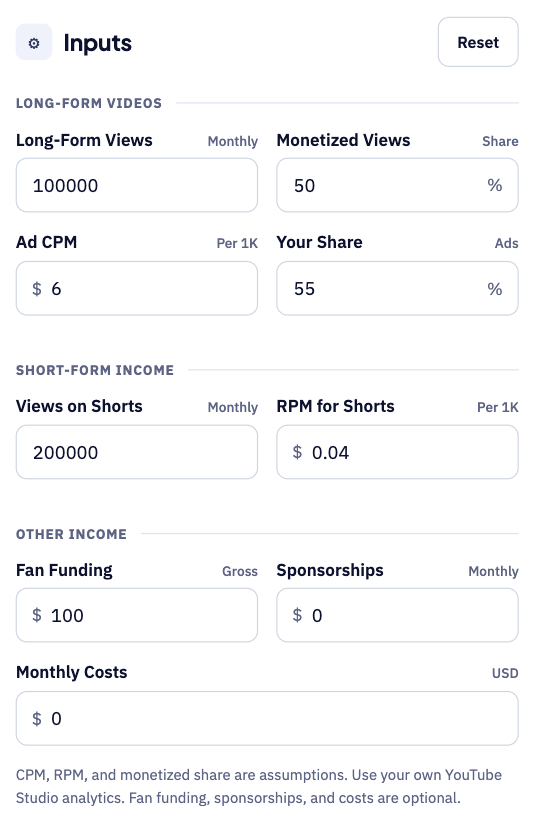
Step 1: Enter your views and income sources
Start with your monthly long-form views and the share that is monetized. Add your ad CPM, your revenue share and your Shorts views and RPM, then include fan funding, sponsorships and monthly costs for a complete picture.
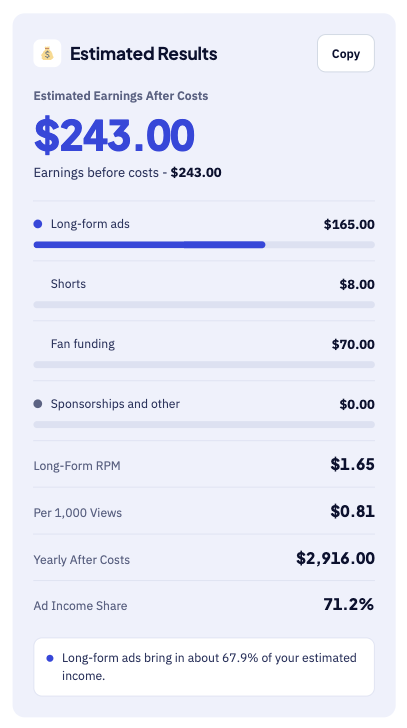
Step 2: Read your estimated earnings
The large number shows your estimated monthly earnings after costs. Below it, you see long-form ads, Shorts, fan funding and your yearly total. For instance, 100,000 long-form views plus Shorts and fan funding give about $243 each month.
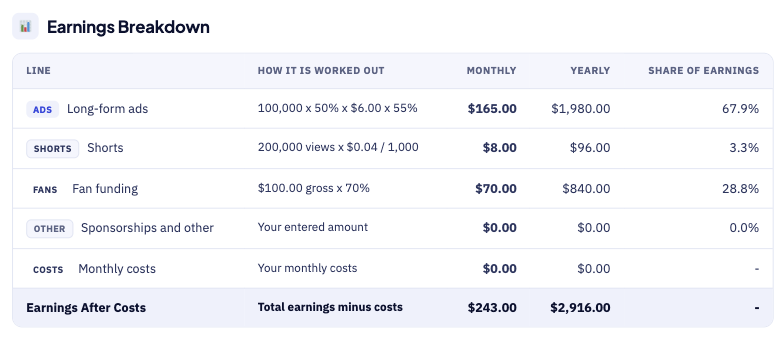
Step 3: Check the breakdown table
The breakdown table shows how each figure is worked out. For example, 100,000 views at 50% monetized, $6 CPM and 55% share give $165. Each row shows the sum behind the number, so errors are easy to spot.
How the YouTube Revenue Calculator Works
The calculator goes from views to yearly income in five steps.
- First, enter your monthly long-form views and the share showing ads.
- Next, add your ad CPM and the 55% share YouTube states.
- Then, enter your monthly Shorts views and your own Shorts RPM.
- After that, add gross fan funding, which the tool reduces by 30%.
- Finally, add sponsorships and costs to see monthly and yearly income.
YouTube Revenue Calculator Inputs
Each input does a different job, as the table shows.
| Input | Meaning | Why It Matters |
|---|---|---|
| Long-form views | Views on regular videos each month | Sets your main ad audience |
| Monetized views | Share of views that show an ad | Not every view earns money |
| Ad CPM | What advertisers pay per 1,000 ad views | Varies by niche and country |
| Your share | Creator share of ad revenue | YouTube states 55% on Watch Page ads |
| Shorts views | Views on Shorts each month | Drives Shorts earnings |
| Shorts RPM | Your earnings per 1,000 Shorts views | Shorts pay far less per view |
| Fan funding | Gross memberships, Super Chat, Stickers, and Thanks | Creators receive 70% of this |
| Sponsorships and other | Other monthly income | Adds non-YouTube income |
| Monthly costs | Gear, editors, and software | Shows earnings after costs |
First, long-form views and monetized views set your ad audience. However, CPM is what advertisers pay, not what you earn. For that reason, the tool applies your creator share to the CPM.
Next, Shorts pay from a shared pool, and creators keep 45% of allocated revenue. Use the Shorts RPM from your own YouTube Studio analytics.
YouTube Revenue Shares at a Glance
YouTube states a different creator share for each income stream.
| Income Stream | Creator Share Stated by YouTube |
|---|---|
| Long-form ads on the Watch Page | 55% of net revenue |
| Shorts feed ads | 45% of the revenue allocated to you from the creator pool |
| Memberships, Super Chat, Super Stickers, Super Thanks | 70% of net revenue |
Therefore, the calculator applies a different share to each stream. Shorts revenue comes from a shared pool of creator earnings.
YouTube Revenue Formula
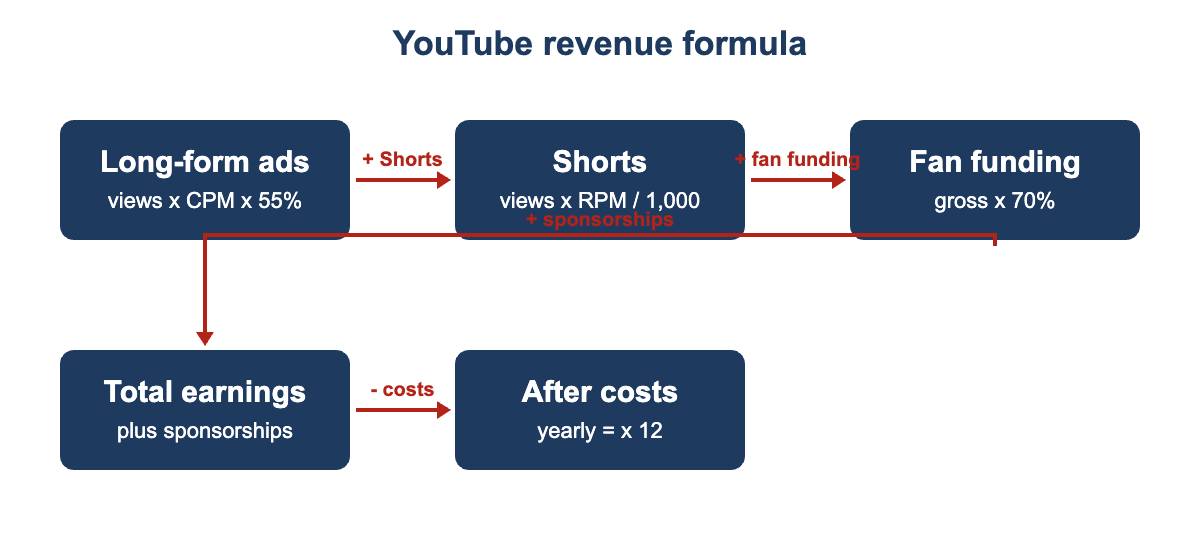
The YouTube revenue formula adds four income streams, then subtracts your costs.
The diagram below shows each formula step in the right order.
- First, long-form ads equal monetized views times CPM, divided by 1,000.
- Next, apply your 55% share to get the long-form ad earnings.
- Then, Shorts earnings equal Shorts views times your RPM, divided by 1,000.
- After that, fan funding equals gross funding multiplied by your 70% share.
- Total earnings equal all streams plus sponsorships and other income.
- Effective RPM equals long-form earnings divided by views, times 1,000.
- Finally, yearly estimate equals total earnings minus costs, times twelve months.
YouTube Revenue Calculator Example
Suppose a channel gets 100,000 long-form views a month, and half show an ad. The CPM is $6, and the creator keeps the 55% share. Finally, it gets 200,000 Shorts views at a $0.04 RPM and $100 of fan funding.
- First, long-form ad earnings come to $165.00 per month in this case.
- Next, the effective long-form RPM is $1.65 per 1,000 views.
- Then, Shorts earnings come to $8.00 from 200,000 Shorts views.
- After that, fan funding after the 70% share is $70.00.
- As a result, total monthly earnings are $243.00 before any costs.
- Finally, the yearly estimate at that same pace is $2,916 in total.
The example shows why subscribers and views alone do not decide income. However, a high-CPM niche can earn several times more from the same views.
What Changes Your Real YouTube Earnings
Your real YouTube earnings can differ from the estimate for several reasons.
- Finance, software, and business topics usually have higher CPMs than entertainment.
- Viewers in some countries are worth more to advertisers.
- Longer videos can carry more ad slots if viewers keep watching.
- Watch time and retention shape recommendations, and recommendations shape views.
- Then, advertiser demand is usually strongest in Q4 and softer early in the year.
- However, Shorts views are plentiful but earn far less per view than long-form.
- Finally, sponsorships, memberships, and products often earn more than ads for smaller channels.
YouTube Partner Program Requirements
You must join the YouTube Partner Program to earn ad revenue on your channel. Currently, the standard tier requires 1,000 subscribers plus qualifying watch hours or Shorts views.
That means 4,000 watch hours in 12 months or 10 million Shorts views. You need an AdSense account and must follow the monetization policies. However, YouTube has announced eligibility changes from February 1, 2027, so check YouTube Help.
When YouTube Pays Creators
Once you reach your payment threshold, YouTube pays on a monthly cycle. First, finalised earnings from last month reach AdSense between the 7th and 12th.
Then, payments follow around the 21st to 26th of the month. However, exact timing can vary, so check your AdSense payments page.
YouTube Revenue Calculator Estimates vs Actual Earnings
Your YouTube Studio numbers will rarely match the estimate exactly. A few known factors explain most of the difference. For instance, a single viral video can lift one month sharply.
| Item | Calculator Estimate | Real YouTube Studio |
|---|---|---|
| CPM and RPM | Fixed values you enter | Change by niche, country, and season |
| Monetized views | One percentage you enter | Depends on advertiser demand and viewer location |
| Shorts | One RPM value | Shorts RPM is much lower and varies |
| Payment | Instant estimate | Paid after you reach the payment threshold |
Therefore, copy your real RPM from Studio into the tool. Update it every month as your audience and niche change. Finally, keep a short log of monthly differences to improve future estimates.
Small audiences can swing sharply from one month to the next, so compare the same months across different years to spot seasonal patterns.
Common YouTube Revenue Calculator Mistakes
Small errors add up, so avoid these common mistakes.
- Never confuse CPM with RPM, because RPM is what you earn.
- Avoid assuming every view shows an ad, because many views earn nothing.
- Remember that Shorts earn far less per view than long-form videos.
- Do not forget that fan funding is reduced by YouTube’s 30% share.
- Never assume one viral month will repeat every month.
- Remember that all estimates shown here are before any income tax.
Tips for Better YouTube Estimates
A few habits keep your YouTube estimates close to reality.
- Use the CPM and RPM shown in your YouTube Studio analytics.
- Test a low case using half of your usual views.
- Test a high case after a video that performs well.
- Enter sponsorships separately so you can see ad dependence clearly.
- Update the inputs each month as your audience changes.
Limits of the YouTube Revenue Calculator
No calculator can predict the exact income for any YouTube channel. It uses the CPM and RPM you enter, not live auction data, and it cannot see your audience mix, seasonality, or advertiser demand shifts.
It also ignores taxes, currency changes, and any payment or bank fees. Compare estimates with your real YouTube Studio earnings each month.
Related Calculators
YouTube is only one of several places to earn from content.
- Try our Mobile Game Revenue Calculator for ads and in-app income.
- Game developers can use the Steam Revenue Calculator for game sales.
- App makers can try the AdMob Revenue Calculator for ad income.
YouTube Revenue Calculator FAQs
How much does YouTube pay creators?
YouTube states that creators receive 55% of net revenue from ads on Watch Page videos. For Shorts, creators receive 45% of the revenue allocated to them from the pool. Memberships, Super Chat, Super Stickers, and Super Thanks pay creators 70% of net revenue.
What is the difference between CPM and RPM?
CPM is what advertisers pay for each 1,000 ad views served. In contrast, RPM is what you earn per 1,000 video views after YouTube’s share. Therefore, RPM is usually lower than CPM, because not every view shows an ad.
What do I need to join the YouTube Partner Program?
The standard tier currently requires 1,000 subscribers plus 4,000 watch hours in 12 months. Alternatively, you can have 10 million qualified Shorts views in the last 90 days. Follow the monetization policies, hold an AdSense account, and check YouTube Help.
When does YouTube pay?
Once you reach your payment threshold, YouTube adds finalised earnings to AdSense. First, that happens between the 7th and 12th of the following month. Then, payments follow around the 21st to 26th of the month.
What CPM and Shorts RPM should I use?
There is no single correct figure that fits every channel or niche. The defaults in this tool are only rough placeholder values. Instead, use the numbers from your own YouTube Studio analytics.
Is this before tax?
Yes, all estimates shown here are before any income tax. However, YouTube requires tax information before it can pay you.
Conclusion
The YouTube revenue calculator turns views, Shorts, and fan funding into monthly income. Use it to plan goals, compare scenarios, and test new income streams, then check the results against your real YouTube Studio data.
Revenue shares and payment timing come from YouTube Help’s partner earnings overview. They also come from the YouTube Help Shorts revenue sharing page. We last checked these figures and sources on September 30, 2026.
This tool gives estimates only, so see our Disclaimer and Tools Policy.
More Revenue Calculators to Try
Pick another calculator to compare income across different platforms and revenue sources.