
Use this Amazon revenue calculator to compare seller profit from FBA and self-shipping.
Live EstimatorAmazon Revenue Calculator
Inputs
Product
Sales and ads
Amazon fees
Fulfillment
Estimated Results
Profit Breakdown
| Line | How It Is Worked Out | Monthly | Yearly | Share of Sales |
|---|---|---|---|---|
| SALES Product sales | ||||
| REF Referral fees | ||||
| SHIP Fulfillment costs | ||||
| PLAN Selling plan fee | ||||
| ADS Advertising | ||||
| COGS Cost of goods | ||||
| Monthly Profit |
Sales Scenarios
This table scales units sold only. Price, fees, and costs stay fixed.
| Scenario | Units Sold | FBA Profit | Self-Ship Profit | Better Option |
|---|
This tool gives estimates only. See our Disclaimer and Tools Policy.
On this page
- Amazon Revenue Calculator Overview
- What Is an Amazon Revenue Calculator?
- Who Should Use the Amazon Revenue Calculator?
- How to Use the Amazon Revenue Calculator Step by Step
- How the Amazon Revenue Calculator Works
- Amazon Revenue Calculator Inputs
- FBA vs Self-Shipping at a Glance
- Amazon Revenue Formula
- Amazon Revenue Calculator Example
- What Changes Your Real Amazon Profit
- Amazon Revenue Calculator Estimates vs Actual Profit
- Common Amazon Revenue Calculator Mistakes
- Tips for Better Amazon Estimates
- Limits of the Amazon Revenue Calculator
- Related Calculators
- Amazon Revenue Calculator FAQs
- Conclusion
- More Revenue Calculators to Try
The Amazon revenue calculator is a free tool that compares your monthly profit from FBA with your profit from shipping orders yourself. It subtracts referral fees, selling plan fees, fulfillment costs, ads and product costs from your sales for each method, then names the more profitable one. Referral and plan fees apply to both methods, so the choice usually comes down to fulfillment and storage costs.
It also shows the profit gap per unit. Every result is an estimate, not a promise.
Amazon Revenue Calculator Overview
| Category | Details |
|---|---|
| Calculator Type | Amazon seller profit and fulfillment comparison estimator |
| Main Purpose | Compare FBA and self-shipped profit for the same product |
| Main Inputs | Price, cost, units, ads, referral fee, FBA fee, ship cost |
| Main Output | Profit for each method, better option, and gap per unit |
| Currency | US dollars |
| Accuracy | Estimate only; fees depend on size, weight, and category |
| Best For | Amazon sellers choosing between FBA and shipping themselves |
What Is an Amazon Revenue Calculator?
An Amazon revenue calculator estimates what a product earns after fees and costs. It multiplies your price by the units you sell, then subtracts Amazon’s fees, advertising, product costs and fulfillment costs.
The cheapest fulfillment method is not always the obvious one, so this calculator runs both side by side. A light, small product may favor FBA, while a bulky one may not.
Who Should Use the Amazon Revenue Calculator?
People use it for different planning goals.
- New sellers can choose a fulfillment method before launch.
- Current FBA sellers can test whether self-shipping would save money, which is often the case for lighter products.
- Product researchers can compare several ideas on the same basis and screen out the ones with thin margins.
- Small brands can plan margins before they negotiate with suppliers.
How to Use the Amazon Revenue Calculator Step by Step
Using the Amazon revenue calculator takes three steps: enter your numbers, compare the two results, then check the table to see how each figure is worked out.
Step 1: Enter your product, sales and fee details
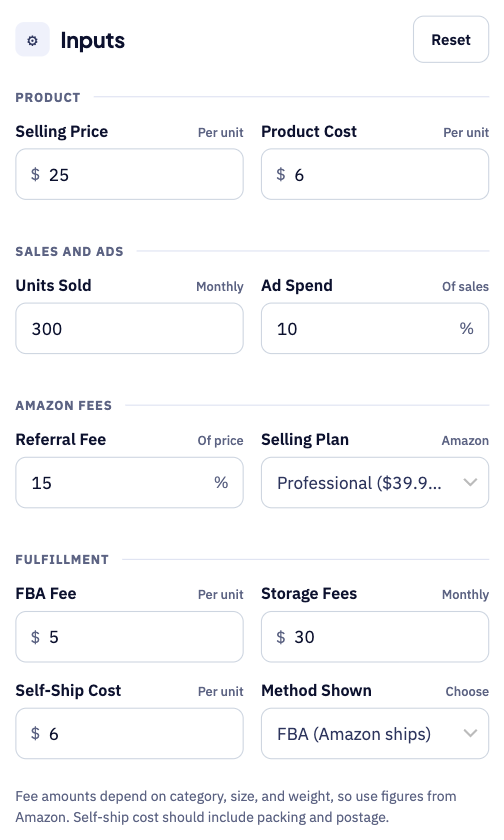
Start with your selling price, product cost and monthly units sold. Add your ad spend, referral fee and Amazon selling plan, then the FBA fee, storage fees and your self-ship cost per unit.
Step 2: Compare FBA and self-shipping profit
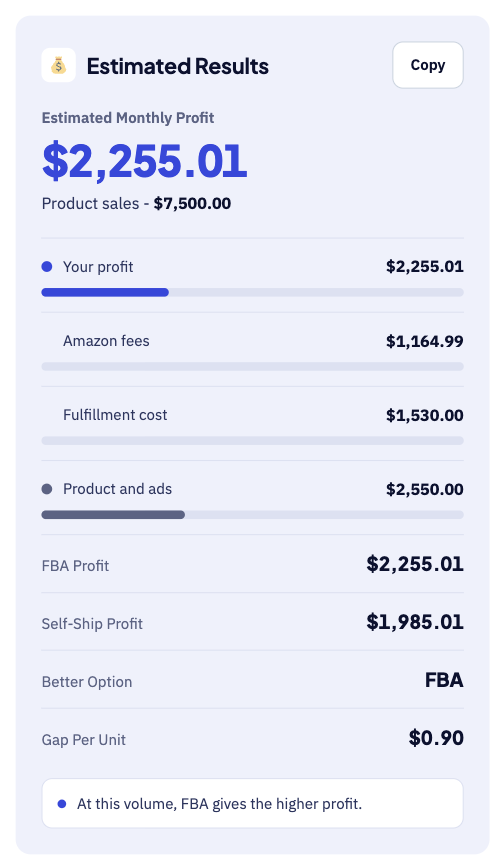
The large number shows your estimated monthly profit for the chosen method. Below it, the tool compares FBA profit with self-ship profit and names the better option. For instance, FBA earns about $2,255 and self-shipping earns about $1,985 a month.
Step 3: Check the breakdown table
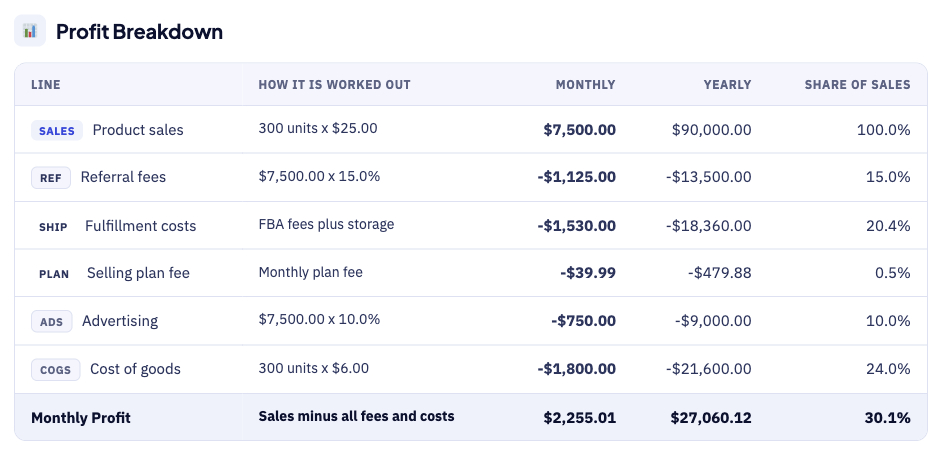
The breakdown table shows how each figure is worked out. For example, 300 units at $25 give $7,500 in product sales. Each row shows the sum behind the number, so errors are easy to spot.
How the Amazon Revenue Calculator Works
The calculator goes from price to a clear comparison in five steps.
- First, enter your selling price and your cost for each product.
- Next, enter your monthly units sold and your advertising spend.
- Then, add your referral fee and pick your selling plan.
- After that, enter your FBA fee, storage fees, and self-ship cost.
- Finally, read the profit for both methods and the better option, and compare it with your target margin.
Amazon Revenue Calculator Inputs
Each input does a different job, as the table shows.
| Input | Meaning | Why It Matters |
|---|---|---|
| Selling price | Price a customer pays for one unit | Drives your sales |
| Product cost | What you pay for one unit | Your largest cost in most cases |
| Units sold | Units sold each month | Scales sales and fees |
| Ad spend | Advertising as a share of sales | Reduces your profit |
| Referral fee | Percentage Amazon keeps from each sale | Applies to both methods |
| Selling plan | Individual or Professional plan | Changes your fixed fees |
| FBA fee | Fulfillment fee for each unit | Applies only to FBA |
| Storage fees | Monthly inventory storage cost | Applies only to FBA |
| Self-ship cost | Packing and postage for each order | Applies only to self-shipping |
Price, cost and units set your sales and product costs. The fulfillment inputs then decide which method wins, which is why accurate fee and shipping amounts matter most.
FBA vs Self-Shipping at a Glance
Amazon describes FBA as outsourced storage and delivery, so the cost structures differ.
| Item | FBA | Self-Shipping |
|---|---|---|
| Who ships orders | Amazon picks, packs, and ships | You pack and ship each order |
| Customer service and returns | Handled by Amazon, per its FBA guide | Handled by you |
| Main fulfillment cost | FBA fee by size and weight | Postage and packing you pay |
| Storage | Monthly storage fees apply | Your own space or warehouse |
| Referral and plan fees | Apply | Apply |
Compare the full cost of each method, not just the shipping line. Your own time has a real value too.
Amazon Revenue Formula
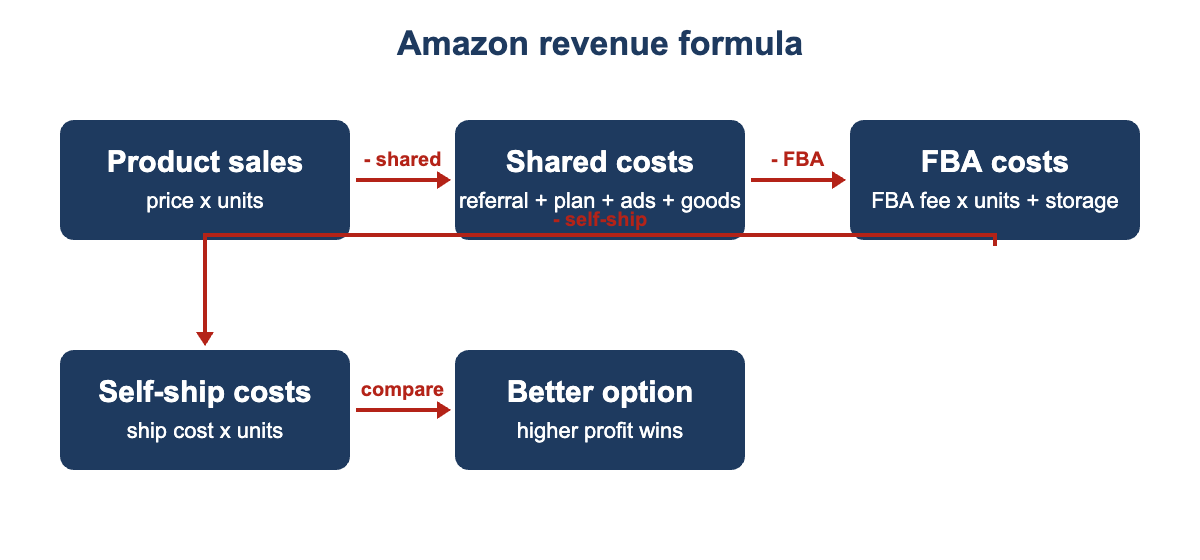
The Amazon revenue formula subtracts shared costs once, then compares fulfillment costs.
The diagram below shows each formula step in the right order.
- First, product sales equal your selling price times the units sold.
- Next, the referral fee equals sales times your referral percentage.
- Then, advertising equals sales times your ad spend percentage each month.
- After that, product costs equal units times your cost for each unit.
- Also, FBA costs equal units times the FBA fee, plus storage.
- In addition, self-ship costs equal units times your cost for each order.
- Finally, profit for each method equals sales minus shared costs and fulfillment.
Amazon Revenue Calculator Example
Suppose a product sells for $25 and costs $6 to make. The seller moves 300 units a month, spends 10% on ads and pays 15% referral fees.
- First, product sales come to $7,500 for the whole month.
- Next, referral fees take $1,125 and advertising takes another $750.
- Then, product costs are $1,800 and the Professional plan adds about $40.
- After that, FBA at $5 a unit plus $30 storage costs $1,530.
- However, self-shipping at $6 a unit costs $1,800 in total instead.
- As a result, FBA earns about $2,255 and self-shipping about $1,985.
FBA wins by about $270, or roughly 90 cents per unit. A higher self-ship cost would widen that gap.
What Changes Your Real Amazon Profit
Real Amazon profit drifts away from the estimate for several reasons.
- Product size and weight change the FBA fee tier.
- Postage rates change by carrier, zone and package weight.
- Advertising costs often rise on new or competitive listings.
- Returns and damaged units eat into sales and margins.
- FBA storage rates can rise in the fourth quarter.
- A competitor’s price drop can cut your sales quickly, and Amazon can update its fees during the year.
Amazon Revenue Calculator Estimates vs Actual Profit
Your Seller Central reports will rarely match the estimate exactly. A few known factors explain most of the difference.
| Item | Calculator Estimate | Real Report |
|---|---|---|
| Sales | Steady units every month | Change with seasons, ranking, and promotions |
| Fees | Fee amounts you enter | Depend on category, size, weight, and date |
| Shipping | One average cost per order | Varies by weight, zone, and carrier |
| Returns | Not included | Reduce revenue and may add fees |
Treat the result as a planning range, not a promise. Compare it with your Seller Central reports every month, and keep a short log of the differences. Over a few months, that log makes your estimates much sharper.
Common Amazon Revenue Calculator Mistakes
Small errors add up. These are the most common ones.
- Comparing only the shipping line, when storage and time also matter.
- Guessing the FBA fee, when size and weight decide it.
- Forgetting that advertising can easily erase a thin margin.
- Leaving packing materials, labels, tape and shipping software out of your self-ship cost.
- Assuming steady sales during your first few months.
- Forgetting that every estimate here is before income tax. Tax rules differ by state and country, so ask an accountant.
Tips for Better Amazon Estimates
A few habits keep your Amazon estimates close to reality.
- Copy exact fees from Amazon for your own product.
- Test a low case with half your expected units and a high case with fifty percent more.
- Weigh and measure a packed order to find real postage, then compare quotes from at least two carriers.
- Include advertising from day one, and track ad spend separately for each product.
- Update the inputs each month as your sales change, and recheck Amazon’s fee pages whenever your product dimensions change.
Limits of the Amazon Revenue Calculator
No calculator can predict the exact profit for an Amazon product. This one uses the fees and sales you enter, not live Amazon data, and it cannot see ranking changes, reviews or competitor moves.
It also ignores returns, income tax and one-time inventory costs. Compare it with your real Seller Central reports each month.
Related Calculators
This tool pairs well with our other seller and pricing calculators.
- For example, try our FBA Revenue Calculator for a full FBA fee breakdown.
- Test price changes with the Marginal Revenue Calculator.
- Hosts can try the Airbnb Revenue Calculator for rental income.
Amazon Revenue Calculator FAQs
What is the difference between FBA and self-shipping?
With FBA, Amazon stores, packs and ships your orders and handles customer service and returns. With self-shipping, all of that is on you, so the two methods have very different cost structures.
Which is more profitable, FBA or self-shipping?
It depends on your product’s size, weight, price and order volume. FBA fees rise with size and weight, which is why the calculator compares both methods with your own numbers.
What fees does Amazon charge every seller?
Amazon lists an Individual plan at $0.99 per item sold and a Professional plan at $39.99 a month. Referral fees of 5% to 45% apply on top, depending on the product category.
Do self-shipping sellers pay FBA fees?
No. FBA fulfillment and storage fees apply only when Amazon fulfills your orders, though referral and selling plan fees still apply. The calculator drops FBA costs when you pick self-shipping.
What should I include as self-ship cost?
Include packing materials, labels, postage and any time cost you assign, plus shipping software fees if you use them. Use an average across your typical orders.
How accurate is the Amazon revenue calculator?
It is only as accurate as your inputs. Amazon fees depend on category, size, weight and other factors, so copy the exact fees from Amazon before you decide.
Conclusion
The Amazon revenue calculator turns price, fees and shipping costs into a clear comparison of the two methods. Use it to plan margins, test products and choose how to ship, then check the results against your real Seller Central data.
Fee details come from Amazon’s selling pricing page for new sellers. They also come from Amazon’s guide to FBA fees for sellers. We last checked these sources and figures on October 1, 2026.
This tool gives estimates only, so see our Disclaimer and Tools Policy.
More Revenue Calculators to Try
Pick another calculator to compare income across different platforms and revenue sources.