
Use this Airbnb revenue calculator to estimate monthly host income, fees, and profit.
Live EstimatorAirbnb Revenue Calculator
Inputs
Pricing
Bookings
Fees and costs
Estimated Results
Income Breakdown
| Line | How It Is Worked Out | Monthly | Yearly | Share of Gross |
|---|---|---|---|---|
| NIGHTS Nightly income | ||||
| CLEAN Cleaning fees paid by guests | ||||
| FEE Airbnb service fee | ||||
| COSTS Cleaning costs | ||||
| OTHER Other monthly costs | ||||
| Monthly Profit |
Occupancy Scenarios
This table scales occupancy only, capped at 100%. Rate, fees, and costs stay fixed.
| Scenario | Occupancy | Booked Nights | Monthly Profit | Yearly Profit |
|---|
This tool gives estimates only. See our Disclaimer and Tools Policy.
On this page
- Airbnb Revenue Calculator Overview
- What Is an Airbnb Revenue Calculator?
- Who Should Use the Airbnb Revenue Calculator?
- How to Use the Airbnb Revenue Calculator Step by Step
- How the Airbnb Revenue Calculator Works
- Airbnb Revenue Calculator Inputs
- Airbnb Host Fees at a Glance
- Airbnb Revenue Formula
- Airbnb Revenue Calculator Example
- What Changes Your Real Airbnb Earnings
- Airbnb Revenue Calculator Estimates vs Actual Earnings
- Common Airbnb Revenue Calculator Mistakes
- Tips for Better Airbnb Estimates
- Limits of the Airbnb Revenue Calculator
- Related Calculators
- Airbnb Revenue Calculator FAQs
- Conclusion
- More Revenue Calculators to Try
The Airbnb revenue calculator is a free tool that turns your nightly rate and bookings into a monthly profit estimate. It adds nightly income and cleaning fees, then takes off Airbnb’s host fee, cleaning costs and your other monthly costs. It also shows your break-even occupancy, the share of nights you must book to cover your costs.
Every result is an estimate, not a promise.
Airbnb Revenue Calculator Overview
| Category | Details |
|---|---|
| Calculator Type | Airbnb host income and profit estimator |
| Main Purpose | Estimate monthly and yearly profit from a short-term rental |
| Main Inputs | Nightly rate, cleaning fee, occupancy, stay length, fees, costs |
| Main Output | Gross income, host payout, profit, and break-even occupancy |
| Currency | US dollars |
| Accuracy | Estimate only; real bookings vary by season and market |
| Best For | Hosts, property managers, and new investors |
What Is an Airbnb Revenue Calculator?
An Airbnb revenue calculator estimates how much a listing earns after costs. First, it multiplies the booked nights by your nightly rate. Then it adds cleaning fees and subtracts Airbnb’s fee and your costs.
However, gross bookings are not the same thing as profit. Therefore, the calculator also counts cleaning costs and fixed monthly costs. For example, a busy month can still lose money after expenses.
Who Should Use the Airbnb Revenue Calculator?
People use it for different planning goals.
- New hosts can test a nightly rate before listing.
- Investors can check whether a property can cover its costs.
- Co-hosts can estimate income before agreeing on a fee split.
- Finally, owners can compare peak and low seasons side by side.
How to Use the Airbnb Revenue Calculator Step by Step
Using the Airbnb revenue calculator takes three steps: enter your numbers, read the results, then check the table to see how each figure is worked out.
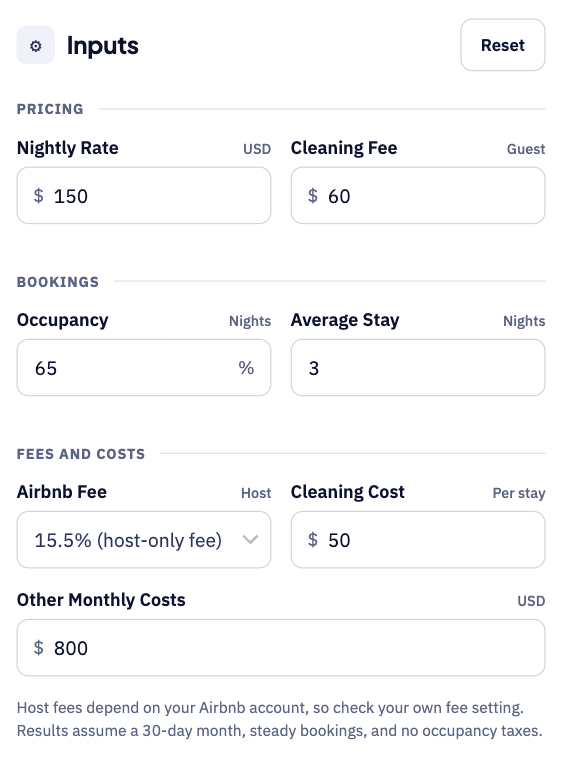
Step 1: Enter your rates, bookings and costs
Start with your nightly rate, cleaning fee and expected occupancy. Add your average stay length and your Airbnb host fee setting, then enter your cleaning cost per stay and other monthly costs.
Step 2: Read your estimated monthly profit
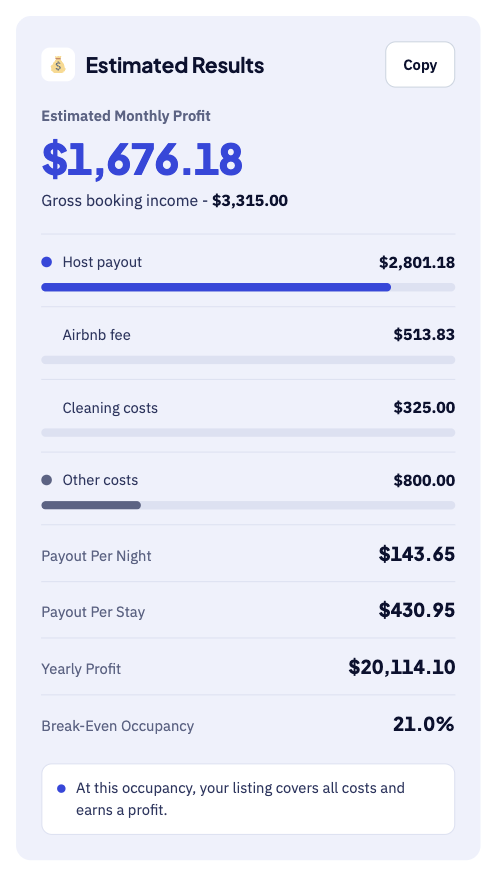
The large number shows your estimated monthly profit after fees and costs. Below it, you see payout per night, yearly profit and break-even occupancy. For instance, a $150 rate at 65% occupancy leaves about $1,676 monthly.
Step 3: Check the breakdown table
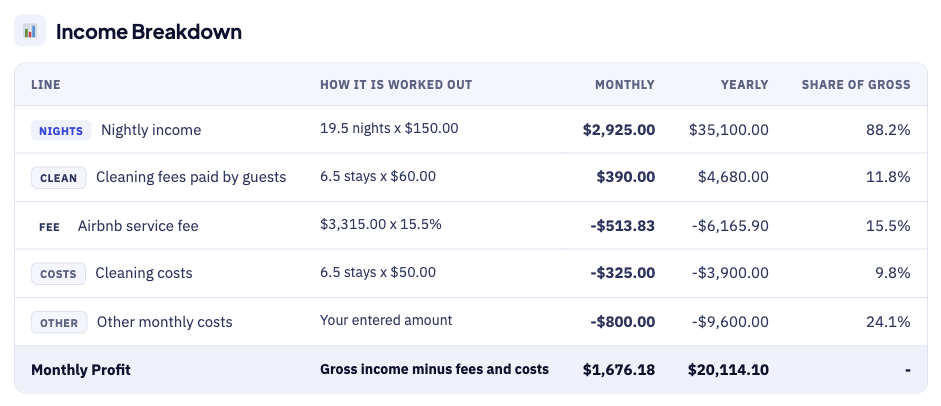
The breakdown table shows how each figure is worked out. For example, 19.5 booked nights at $150 give $2,925 in nightly income. Each row shows the sum behind the number, so errors are easy to spot.
How the Airbnb Revenue Calculator Works
The calculator goes from bookings to profit in five steps.
- First, enter your nightly rate and the cleaning fee guests pay.
- Next, enter your occupancy rate and your average stay length.
- Then, pick your Airbnb fee model and add cleaning costs.
- After that, add your other monthly costs, such as a mortgage.
- Finally, read your profit, yearly estimate, and your break-even occupancy.
Airbnb Revenue Calculator Inputs
Each input does a different job, as the table shows.
| Input | Meaning | Why It Matters |
|---|---|---|
| Nightly rate | Price a guest pays for one night | Drives most of your income |
| Cleaning fee | Fee a guest pays for each stay | Helps cover your cleaning costs |
| Occupancy | Share of nights that are booked | Shows how busy the listing is |
| Average stay | Nights per booking | Sets how many cleanings you need |
| Airbnb fee | Host fee model, such as 15.5% | Reduces your payout |
| Cleaning cost | What you pay for each cleaning | Reduces your profit per stay |
| Other monthly costs | Mortgage, utilities, and supplies | Sets your break-even point |
First, the nightly rate and occupancy set your booking income. Then the cleaning fee and stay length set how many cleanings you pay for. For that reason, short stays can raise your cleaning costs.
Airbnb Host Fees at a Glance
Airbnb publishes two fee structures for home hosts, and the calculator supports both.
| Fee Model | Host Pays | Notes |
|---|---|---|
| Single fee | Most hosts pay 15.5% | Others typically pay 14% to 16%; deducted from payout |
| Split fee | Most hosts pay 3% | Being phased out; guests pay a separate service fee |
Therefore, check which model your account uses before you trust any estimate. Airbnb says the single fee applies to new bookings after your switch.
Airbnb Revenue Formula
The Airbnb revenue formula adds nightly income and cleaning fees, then subtracts fees and costs.
The diagram below shows each formula step in the right order.
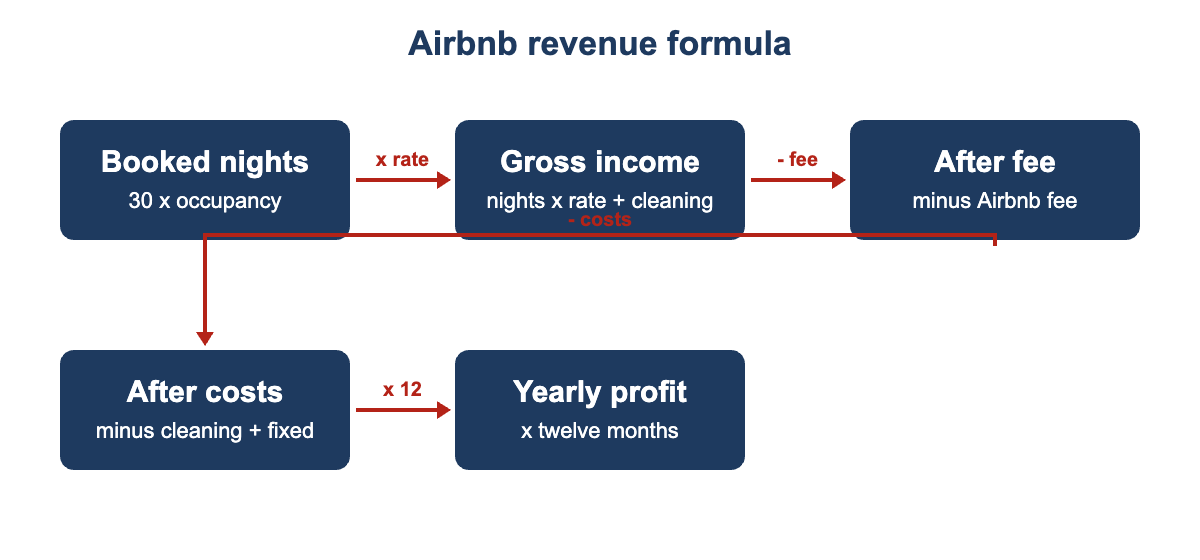
- First, booked nights equal 30 days times your occupancy percentage.
- Next, stays equal booked nights divided by your average stay.
- Then, gross income equals nights times rate, plus stays times cleaning fee.
- After that, the Airbnb fee equals gross income times your fee percentage.
- Cleaning costs equal stays times your cost for each cleaning.
- Monthly profit equals gross income minus the fee and all costs.
- Finally, break-even occupancy equals fixed costs divided by profit per booked night.
Airbnb Revenue Calculator Example
Suppose a listing charges $150 a night and a $60 cleaning fee. It has 65% occupancy, three-night stays, and the 15.5% host fee.
- First, the listing books 19.5 nights, which equals 6.5 stays.
- Next, nightly income is $2,925 and cleaning fees add $390.
- Then, gross income is $3,315 before any Airbnb fee is taken.
- After that, the 15.5% fee takes about $514, leaving about $2,801.
- As a result, $325 of cleaning costs and $800 of other costs remain.
- Finally, monthly profit is about $1,676, or $20,114 over a year.
In this case, the break-even occupancy is only about 21% of nights. Therefore, the listing has a comfortable cushion against slow months.
What Changes Your Real Airbnb Earnings
Your real Airbnb earnings can differ from the estimate for several reasons.
- Seasons and local events can change both rate and occupancy.
- New listings often start with fewer bookings and lower reviews.
- Discounts for long stays reduce your average nightly rate.
- Cancellations and gaps between bookings can lower your occupancy.
- However, strong reviews and photos can support a higher rate.
- Finally, local rules and taxes can limit how many nights you may host.
Airbnb Revenue Calculator Estimates vs Actual Earnings
Your Airbnb earnings report will rarely match the estimate exactly. A few known factors explain most of the difference.
| Item | Calculator Estimate | Real Earnings |
|---|---|---|
| Occupancy | One steady percentage you enter | Changes with seasons, events, and reviews |
| Nightly rate | One average rate | Varies by date, season, and discounts |
| Fees | One fee percentage | Depends on your fee model and account |
| Taxes | Not included | Income and occupancy taxes may apply |
Treat the result as a planning range, not a promise. Compare it with your Airbnb earnings report every month, and keep a short log of monthly differences to improve future estimates.
Common Airbnb Revenue Calculator Mistakes
Small errors add up, so avoid these common mistakes.
- Never treat your gross bookings as your actual profit.
- Avoid assuming full occupancy all year, because slow months are normal.
- Remember that short stays mean more cleanings and higher costs.
- Do not forget fixed costs such as insurance and utilities.
- Never assume the fee model without checking your account.
- Remember that all estimates shown here are before any income tax.
Tips for Better Airbnb Estimates
A few habits keep your Airbnb estimates close to reality.
- Use your real occupancy from the last twelve months.
- Test a low season case using a lower occupancy.
- Enter your true cleaning cost for each single stay.
- Include every fixed cost, even the small recurring ones.
- Update the inputs each month as your bookings change.
Limits of the Airbnb Revenue Calculator
No calculator can predict the exact income for any listing. It uses the rate and occupancy you enter, not live market data, and it cannot see competitor prices, reviews, or local rule changes.
It also ignores income tax, occupancy taxes, and one-time repair costs. Compare estimates with your real Airbnb earnings each month.
Related Calculators
Airbnb is only one way to earn from an asset or a skill.
- Try our Marginal Revenue Calculator to test price changes.
- Creators can use the YouTube Revenue Calculator for ad income.
- Game developers can try the Steam Revenue Calculator for sales.
Airbnb Revenue Calculator FAQs
How much does Airbnb charge hosts?
Airbnb states that most hosts pay a single service fee of 15.5%. Some other hosts pay somewhere between 14% and 16%. Meanwhile, the older split-fee model of about 3% is being phased out.
What is an Airbnb occupancy rate?
Occupancy is the share of available nights that guests actually book. For example, 20 booked nights in a 30-night month equals 67% occupancy. Therefore, higher occupancy raises income without changing your nightly rate.
Does the Airbnb fee apply to cleaning fees?
Airbnb states that its fee applies to the nightly price and any fees you charge. However, it excludes the separate guest service fee and taxes. Check your own account, because fee rules differ by host.
What occupancy do I need to break even?
It depends on your nightly rate, fees, cleaning costs, and fixed monthly costs. The calculator shows your break-even occupancy for you automatically. As a result, you can test several different rates very quickly.
Do I pay tax on Airbnb income?
Income tax and local occupancy taxes may apply to short-term rentals. However, rules vary by city and country, and Airbnb collects some taxes in some places. Therefore, check your local rules or ask a qualified accountant.
Which costs should I include in the calculator?
Include your mortgage or rent, utilities, insurance, supplies, and repairs. Add software, furnishing, and any property management fees you pay. Finally, include cleaning costs per stay as a separate input.
Conclusion
The Airbnb revenue calculator turns rate, occupancy, and costs into a clear monthly profit figure. Use it to plan prices, test seasons, and judge new properties, then check the results against your real Airbnb earnings.
Host fee details come from the Airbnb Help Centre service fee page. We last checked this source and its figures on October 1, 2026.
This tool gives estimates only, so see our Disclaimer and Tools Policy.
More Revenue Calculators to Try
Pick another calculator to compare income across different platforms and revenue sources.