
Use this marginal revenue calculator to estimate the extra revenue from selling one more unit.
Live EstimatorMarginal Revenue Calculator
Inputs
Before the change
After the change
Cost check
Estimated Results
Revenue Breakdown
| Line | How It Is Worked Out | Before | After | Change |
|---|---|---|---|---|
| REV Total revenue | ||||
| UNITS Units sold | ||||
| PRICE Price per unit | ||||
| Marginal revenue per extra unit |
Quantity Scenarios
This table scales the units sold after the change only. Prices and cost stay fixed.
| Scenario | Units After | Revenue After | Revenue Gained | Marginal Revenue |
|---|
This tool gives estimates only. See our Disclaimer and Tools Policy.
On this page
- Marginal Revenue Calculator Overview
- What Is a Marginal Revenue Calculator?
- Who Should Use the Marginal Revenue Calculator?
- How to Use the Marginal Revenue Calculator Step by Step
- How the Marginal Revenue Calculator Works
- Marginal Revenue Calculator Inputs
- Marginal Revenue Formula
- Marginal Revenue Calculator Example
- Why Marginal Revenue Is Below Price
- Marginal Revenue and Profit Maximization
- What Changes Your Real Marginal Revenue
- Marginal Revenue Calculator Results vs Real Markets
- Common Marginal Revenue Calculator Mistakes
- Tips for Better Marginal Revenue Estimates
- Limits of the Marginal Revenue Calculator
- Related Calculators
- Marginal Revenue Calculator FAQs
- Conclusion
- More Revenue Calculators to Try
The marginal revenue calculator is a free tool that shows the extra revenue from selling one more unit. It compares total revenue before and after a change in price and quantity, then divides the revenue change by the change in units. Because a price cut also lowers revenue on the units you already sell, marginal revenue usually sits below the price.
The tool also checks marginal revenue against your marginal cost. Every result is an estimate, not a promise.
Marginal Revenue Calculator Overview
| Category | Details |
|---|---|
| Calculator Type | Marginal revenue and profit-check estimator |
| Main Purpose | Show the extra revenue from each additional unit sold |
| Main Inputs | Units and price before and after, plus marginal cost |
| Main Output | Marginal revenue, revenue change, and a profit signal |
| Currency | US dollars, or any currency you prefer |
| Accuracy | Estimate only; real demand changes with the market |
| Best For | Students, founders, pricing teams, and analysts |
What Is a Marginal Revenue Calculator?
A marginal revenue calculator measures how total revenue changes when you sell more. First, it finds total revenue before and after the change. Then it divides the revenue change by the change in units.
However, marginal revenue is not the same as the selling price. Therefore, the result tells you what the next unit really adds. For example, a price cut can reduce revenue from units you already sell.
Who Should Use the Marginal Revenue Calculator?
People use it for different pricing and planning goals.
- Students can check homework answers on revenue and output.
- Founders can test whether a discount will grow total revenue.
- Pricing teams can compare marginal revenue against marginal cost.
- Finally, analysts can explain revenue changes with a simple, repeatable method.
How to Use the Marginal Revenue Calculator Step by Step
Using the marginal revenue calculator takes three steps: enter your numbers, read the results, then check the table to see how each figure is worked out.
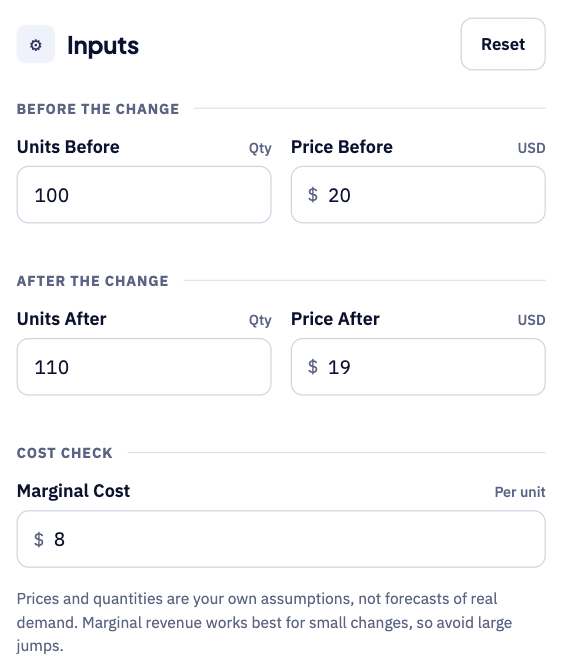
Step 1: Enter your before and after numbers
Start with the units you sold and the price before the change. Add the units and price after the change you want to test, then enter your marginal cost per unit to compare it with revenue.
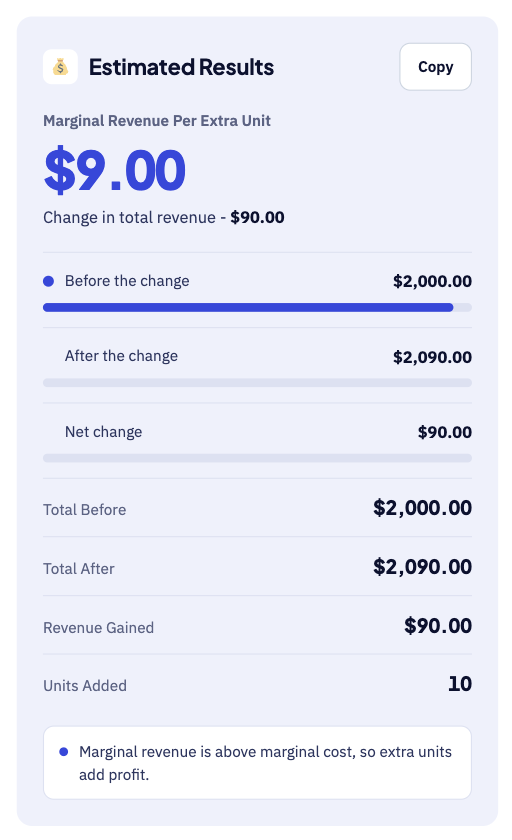
Step 2: Read your marginal revenue
The large number shows the extra revenue you earn from each added unit. Below it, you see total revenue before and after, and the units added. For instance, selling 10 extra units adds $90, so marginal revenue is $9.
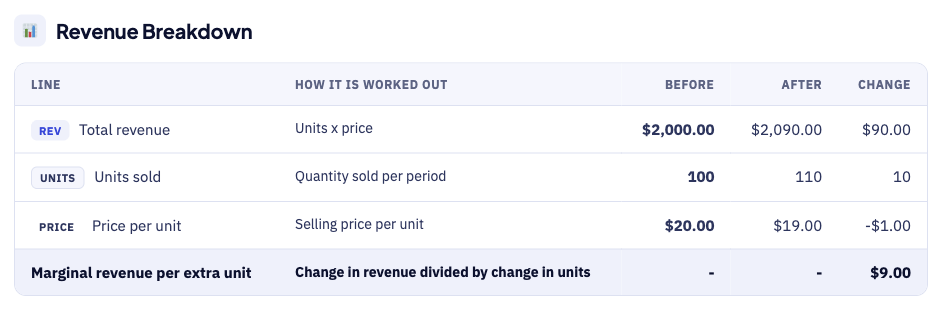
Step 3: Check the breakdown table
The breakdown table shows how each figure is worked out. For example, revenue rises from $2,000 to $2,090 after the change. Each row shows the sum behind the number, so errors are easy to spot.
How the Marginal Revenue Calculator Works
The calculator goes from inputs to a profit signal in five steps.
- First, enter the units you sell and the price before the change.
- Next, enter the units and price you expect after the change.
- Then, add your marginal cost for each additional unit you make.
- After that, read the revenue change and the marginal revenue.
- Finally, check the profit signal and try the quantity scenarios.
Marginal Revenue Calculator Inputs
Each input does a different job, as the table shows.
| Input | Meaning | Why It Matters |
|---|---|---|
| Units before | Quantity sold before the change | Sets your starting revenue |
| Price before | Selling price before the change | Pairs with units to give total revenue |
| Units after | Quantity sold after the change | Shows how many extra units you sell |
| Price after | Selling price after the change | A lower price reduces revenue on older units |
| Marginal cost | Cost to make one more unit | Decides if the extra unit adds profit |
First, the tool multiplies units by price to find total revenue each time. Then it compares the two totals to find the revenue change. For that reason, both prices matter as much as the quantities.
Marginal Revenue Formula
The marginal revenue formula divides the change in total revenue by the change in quantity.
The diagram below shows each formula step in the right order.
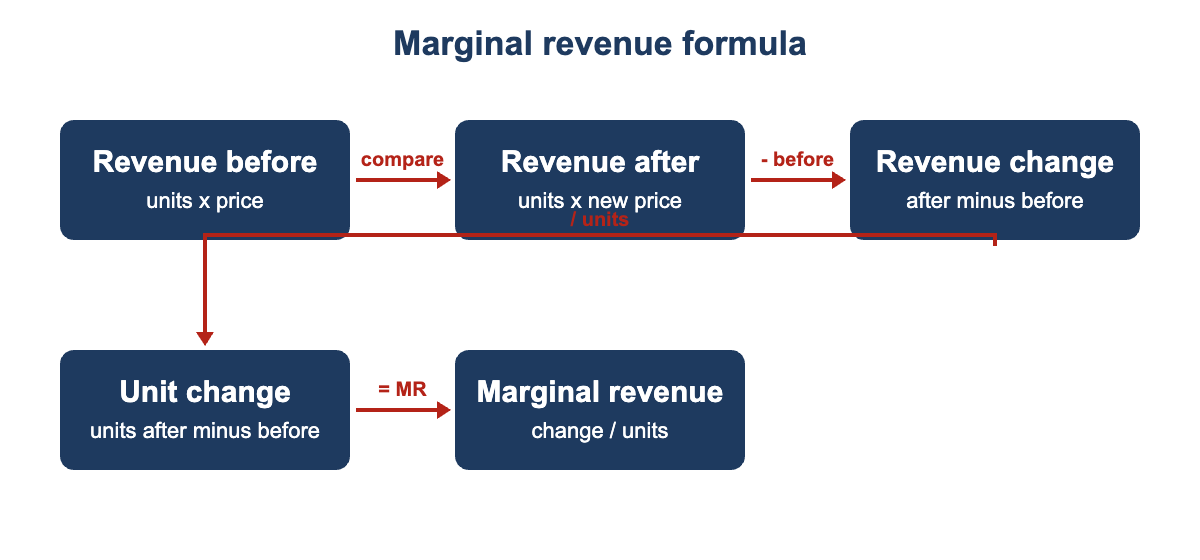
- First, total revenue before equals units before times price before.
- Next, total revenue after equals units after times price after.
- Then, the revenue change equals revenue after minus revenue before.
- After that, the unit change equals units after minus units before.
- Finally, marginal revenue equals the revenue change divided by the unit change.
In a linear demand model, price equals a minus b times quantity. As a result, marginal revenue equals a minus two b times quantity. Therefore, marginal revenue falls twice as fast as the price.
Marginal Revenue Calculator Example
Suppose a small shop sells 100 units at $20 each per month. Then it cuts the price to $19 and sells 110 units.
- First, total revenue before is $2,000 from 100 units at $20.
- Next, total revenue after is $2,090 from 110 units at $19.
- Then, the revenue change is $90 for ten extra units.
- As a result, marginal revenue is $9 for each extra unit.
- However, the price fell by $1 on all 100 earlier units.
- Finally, with a marginal cost of $8, each extra unit adds $1.
The example shows two separate effects working together on total revenue. First, the ten new units add $190 when sold at $19. However, the price cut removes $100 from the earlier 100 units.
Why Marginal Revenue Is Below Price
OpenStax explains that selling one more unit has two effects on revenue. First, you sell one extra unit at the new price. Second, all of the earlier units now sell for less money.
Therefore, marginal revenue sits below the price when the price must fall. In perfect competition, however, a firm takes the market price. As a result, marginal revenue equals price in that case.
Marginal Revenue and Profit Maximization
A profit-maximizing firm keeps adding output until marginal revenue equals marginal cost. Beyond that point, each extra unit costs more than it earns.
| Condition | What It Means | Typical Action |
|---|---|---|
| Marginal revenue above cost | Extra units add profit | Increase output |
| Equal marginal revenue and cost | Profit is at its peak | Hold output steady |
| Cost above marginal revenue | Extra units reduce profit | Reduce output |
Check that total revenue still covers your total costs. Otherwise, a firm can follow this rule and still lose money.
What Changes Your Real Marginal Revenue
Your real marginal revenue can differ from the estimate for several reasons.
- Customers differ in how strongly they react to price changes.
- Competitors may cut their own prices after you cut yours.
- Discounts can pull sales forward from future months.
- Seasonal demand can raise quantity without any price change.
- However, capacity limits can stop you from selling the extra units.
- Finally, bundles and add-ons can change the revenue earned per customer.
Marginal Revenue Calculator Results vs Real Markets
Your sales reports will rarely match the calculator result exactly. A few known factors explain most of the difference.
| Item | Calculator Estimate | Real Market |
|---|---|---|
| Demand | Two fixed price and quantity points | Demand shifts with seasons, ads, and rivals |
| Price effect | One price after the change | Customers may react at different price levels |
| Cost | One marginal cost value | Costs can change as output grows |
| Time | One period compared with another | Effects can build slowly over several months |
Treat the result as a planning aid, not a forecast. Test small price changes before you make any large ones, and keep a short log of results to improve future estimates.
Common Marginal Revenue Calculator Mistakes
Small errors add up, so avoid these common mistakes.
- Never confuse marginal revenue with average revenue or price.
- Avoid comparing periods with very different seasons or promotions.
- Remember that large changes make the result less reliable.
- Do not ignore the revenue lost on units you already sell.
- Never use marginal revenue alone, because costs matter too.
- Remember that all estimates shown here are before any tax.
Tips for Better Marginal Revenue Estimates
A few habits keep your marginal revenue estimates close to reality.
- Use real sales data from two comparable time periods.
- Test small changes, because marginal revenue suits small steps.
- Enter your true marginal cost, not your average cost.
- Rerun the tool after every price test you complete.
- Compare the profit signal with your actual profit each month.
Limits of the Marginal Revenue Calculator
No calculator can predict the exact revenue effect of a price change. It uses only two price and quantity points that you enter, and it cannot see competitor moves, seasonality, or customer mix.
It also ignores taxes, fixed costs, and any one-time expenses. Compare estimates with your real results before you change prices.
Related Calculators
Marginal revenue is only one way to study how a business earns money.
- Try our Steam Revenue Calculator for game sales after fees.
- Creators can use the YouTube Revenue Calculator for ad income.
- App makers can try the AdMob Revenue Calculator for ad earnings.
Marginal Revenue Calculator FAQs
What is marginal revenue?
Marginal revenue is the extra revenue from selling one more unit. In other words, it measures how total revenue changes as quantity changes. Therefore, firms use it to decide how much to produce.
How do you calculate marginal revenue?
Divide the change in total revenue by the change in quantity sold. For example, a $90 revenue gain from ten extra units gives $9 per unit. The calculator above does this step for you automatically.
Why can marginal revenue be negative?
Marginal revenue turns negative when a price cut lowers total revenue. For instance, selling more at a much lower price can lose more than it gains. As a result, adding more output would then reduce total revenue.
What is the difference between marginal revenue and average revenue?
Average revenue is total revenue divided by units sold, which equals the price. In contrast, marginal revenue only covers the revenue from the extra unit. Therefore, the two differ whenever a firm must cut prices to sell more.
When should a firm stop adding output?
A profit-maximizing firm keeps adding output until marginal revenue equals marginal cost. Beyond that point, each extra unit costs more than it earns. Check that total revenue still covers your total costs each month.
Is marginal revenue the same as price?
Only in perfect competition, where a firm takes the market price as given. However, a firm facing falling demand earns less than the price on extra units.
Conclusion
The marginal revenue calculator turns price and quantity changes into one clear number. Use it to test discounts, compare costs, and plan output, then check the results against your real sales data.
The formula and the profit rule come from OpenStax Principles of Economics. We last checked this source and its figures on October 1, 2026.
This tool gives estimates only, so see our Disclaimer and Tools Policy.
More Revenue Calculators to Try
Pick another calculator to compare income across different platforms and revenue sources.