
Use this Spotify revenue calculator to estimate artist royalties from streams, splits, and distributor fees.
Live EstimatorSpotify Revenue Calculator
Inputs
Streams and rate
Splits
Catalog and goal
Estimated Results
Royalty Breakdown
| Line | How It Is Worked Out | Monthly | Yearly | Share of Payout |
|---|---|---|---|---|
| YOU Your share | ||||
| TEAM Collaborators | ||||
| FEE Distributor cut | ||||
| Total Spotify Payout |
Stream Scenarios
This table scales monthly streams only. The rate, splits, and goal stay fixed.
| Scenario | Monthly Streams | Total Payout | Paid To You | Yearly To You |
|---|
This tool gives estimates only. See our Disclaimer and Tools Policy.
On this page
- Spotify Revenue Calculator Overview
- What Is a Spotify Revenue Calculator?
- Who Should Use the Spotify Revenue Calculator?
- How to Use the Spotify Revenue Calculator Step by Step
- How the Spotify Revenue Calculator Works
- Spotify Revenue Calculator Inputs
- How Spotify Pays Artists
- Recording Royalties and Publishing Royalties
- Spotify Revenue Formula
- Spotify Revenue Calculator Example
- What Changes Your Real Spotify Earnings
- Spotify Track Monetization Requirements
- Spotify Revenue Calculator Estimates vs Actual Payouts
- Common Spotify Revenue Calculator Mistakes
- Tips for Better Spotify Estimates
- Limits of the Spotify Revenue Calculator
- Related Calculators
- Spotify Revenue Calculator FAQs
- Conclusion
- More Revenue Calculators to Try
The Spotify revenue calculator is a free tool that estimates the recording royalties your monthly streams earn. It multiplies your streams by a rate per stream, then takes off the distributor cut and your collaborators’ share, so you see what actually reaches your bank account. Keep one thing in mind: Spotify pays from a monthly royalty pool, not a fixed rate, so the best rate to enter is the one on your own statements.
It also shows how many streams you need to hit an income goal. Every result is an estimate, not a promise.
Spotify Revenue Calculator Overview
| Category | Details |
|---|---|
| Calculator Type | Spotify artist royalty estimator |
| Main Purpose | Estimate recording royalties from monthly streams |
| Main Inputs | Streams, rate per stream, distributor cut, ownership, tracks, goal |
| Main Output | Payout, your share, yearly estimate, streams needed |
| Currency | US dollars |
| Accuracy | Estimate only; real rates change by country and month |
| Best For | Independent artists, managers, and labels |
What Is a Spotify Revenue Calculator?
A Spotify revenue calculator estimates how much money your streams may earn. It multiplies your streams by a rate per stream, then subtracts the distributor cut and any collaborator splits.
Spotify does not publish one fixed rate for every stream. That is why the calculator lets you enter your own rate, taken from real statements. Your distributor report shows what each stream actually paid.
Who Should Use the Spotify Revenue Calculator?
People use it for different planning goals.
- New artists can see what their first milestone may earn.
- Bands can test how splits change each member’s income.
- Managers can set realistic monthly income goals for artists.
- Labels can compare distributor fees before choosing a service.
How to Use the Spotify Revenue Calculator Step by Step
Using the Spotify revenue calculator takes three steps: enter your numbers, read the results, then check the table to see how each figure is worked out.
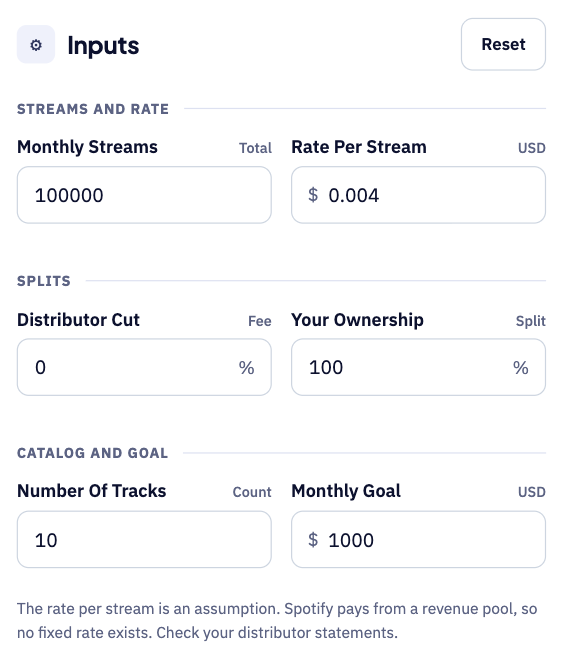
Step 1: Enter your streams and payout rate
Start with your monthly streams and the pay rate per stream. Add your distributor cut and your ownership split of the song, then your track count and a monthly income goal.
Step 2: Read your estimated royalties
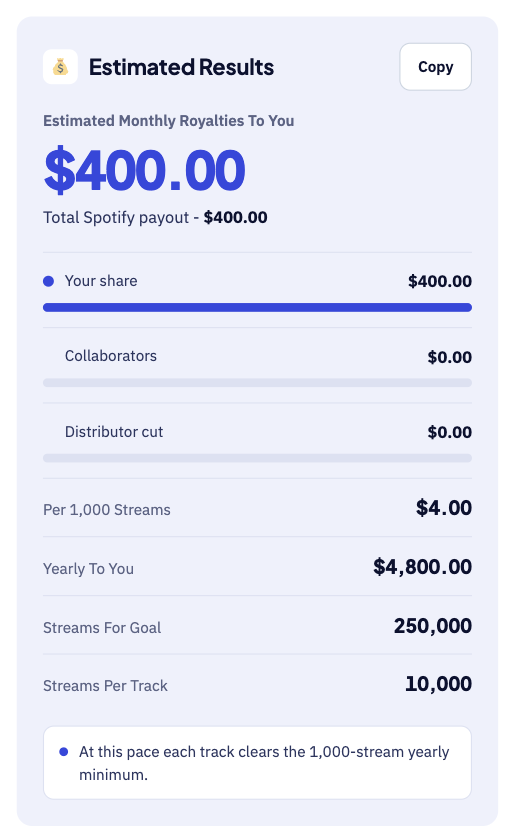
The large number shows the royalties you earn each month. Below it, you see earnings per 1,000 streams and the streams needed for your goal. For instance, 100,000 streams at $0.004 give about $400 per month.
Step 3: Check the breakdown table
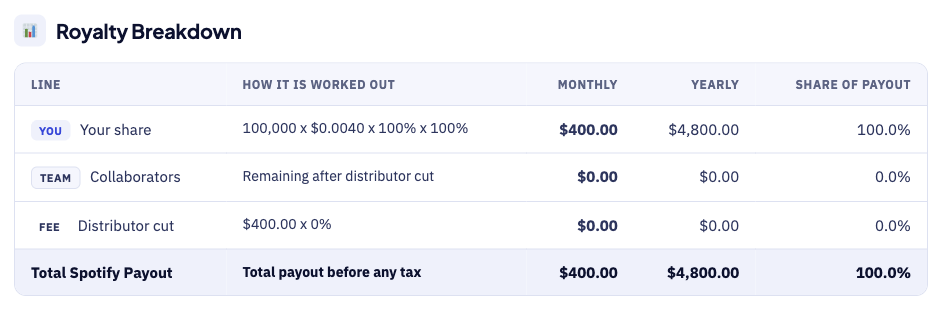
The breakdown table shows how each figure is worked out. For example, a distributor cut of 0% leaves the full $400 with you. Each row shows the sum behind the number, so errors are easy to spot.
How the Spotify Revenue Calculator Works
The calculator moves from streams to yearly income in five steps.
- First, enter your total monthly streams and your rate per stream.
- Next, add the percentage your distributor keeps as a fee.
- Then, enter the share of the track that you own.
- After that, add your track count and your monthly income goal.
- Finally, read your royalties, yearly estimate, and streams needed for the goal.
Spotify Revenue Calculator Inputs
Each input does a different job, as the table shows.
| Input | Meaning | Why It Matters |
|---|---|---|
| Monthly streams | Total streams across all your tracks | Sets your total payout |
| Rate per stream | Average payout for each stream | Varies by country and listener plan |
| Distributor cut | Percentage your distributor keeps | Some services charge zero commission |
| Your ownership | Your share of the recording | Collaborators take the remainder |
| Number of tracks | Tracks that earn streams | Checks the 1,000-stream minimum |
| Monthly goal | Income you want each month | Shows the streams you need |
Streams and rate set the total payout before any splits. The rate is not fixed, so the default of $0.004 is only a placeholder until you add a figure from your own statements.
How Spotify Pays Artists
Spotify uses a stream-share model, not a fixed rate for each stream. In short, it pools its royalty revenue each month and divides it by share.
Your share of total streams decides your share of that pool. Spotify pays rights holders first, and they then pay the artists, so your final income depends on your distributor and your contracts.
Recording Royalties and Publishing Royalties
Streams earn two separate kinds of money for music creators.
- First, recording royalties go to the owner of the master recording.
- Next, publishing royalties go to songwriters, composers, and music publishers.
- For independent artists, a distributor usually collects the recording royalties.
- Publishing royalties come through societies or a publishing administrator.
This calculator covers recording royalties only. Add any publishing income separately, since it arrives through societies or publishers rather than your distributor.
Spotify Revenue Formula
The Spotify revenue formula multiplies streams by rate, then applies your splits.
The diagram below shows each formula step in the right order.
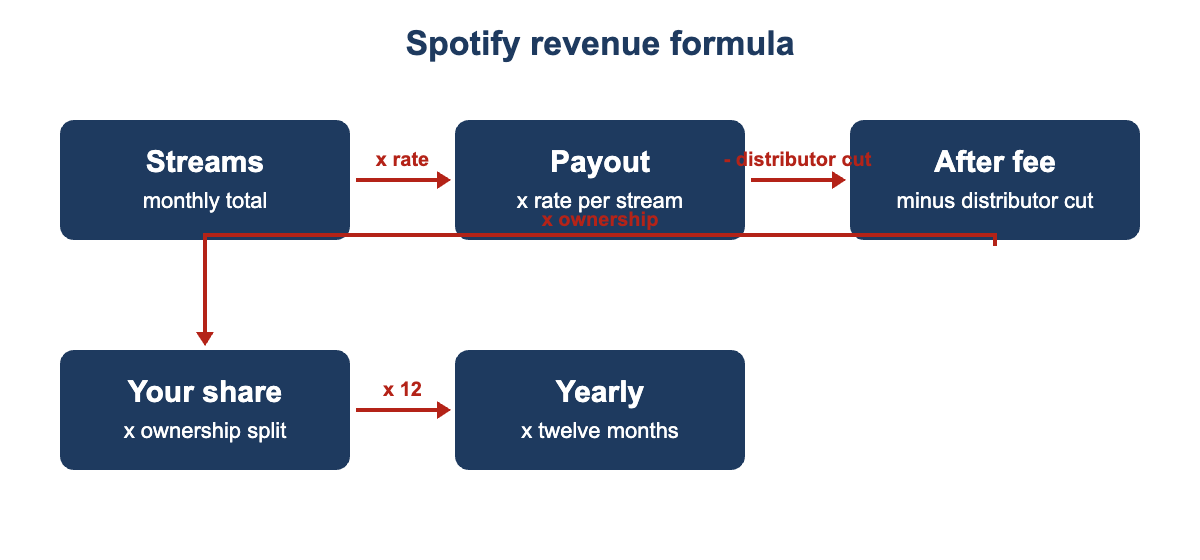
- First, total payout equals monthly streams times your rate per stream.
- Next, the distributor share equals total payout times the distributor cut.
- Then, the remainder equals total payout minus the distributor share.
- After that, your royalties equal the remainder times your ownership percentage.
- Collaborators receive whatever is left after your royalties.
- The yearly estimate equals your monthly royalties times twelve.
- Finally, streams needed equals your goal divided by your royalties per stream.
Spotify Revenue Calculator Example
Suppose a song gets 100,000 streams in a month at $0.004 each. The total payout is then $400.00, or $4.00 per 1,000 streams.
- First, with no distributor cut, you keep the full $400.00 per month.
- Next, reaching $1,000 a month needs 250,000 streams at that rate.
- Then, a 15% distributor cut removes $60.00 from the total payout.
- After that, a 50% ownership share leaves you $170.00 per month.
- Finally, that pace gives you about $2,040.00 over twelve months.
Splits matter as much as stream counts. Your real rate may differ, so check it against your own statements.
What Changes Your Real Spotify Earnings
Real Spotify earnings drift away from the estimate for several reasons.
- Listeners in some countries generate higher payouts than others.
- Premium subscribers usually pay more per stream than free listeners.
- Spotify’s total royalty pool changes from month to month.
- Your share of total streams shifts as other artists grow.
- Spotify filters out artificial streams, and those earn nothing.
- Distributors differ in fees, payout speed and minimum withdrawal rules.
Spotify Track Monetization Requirements
Spotify states that a track needs at least 1,000 streams in the previous 12 months, plus a minimum number of unique listeners.
Tracks below these limits may earn no recording royalties from Spotify at all. Check the current rules on Spotify for Artists before you plan around that income.
Spotify Revenue Calculator Estimates vs Actual Payouts
Your first distributor statement will rarely match the estimate. Timing and rate differences explain most of the gap.
| Item | Calculator Estimate | Real Statement |
|---|---|---|
| Rate per stream | One average rate you enter | Varies by country, plan, and month |
| Timing | Streams counted for this month | Payments often arrive weeks later |
| Fees | One distributor cut percentage | May include flat fees or minimum payouts |
| Streams | All streams you enter | Excludes streams Spotify filters as artificial |
Treat the result as a planning range, not a bill, and run a low case and a high case.
Common Spotify Revenue Calculator Mistakes
Small errors add up. These are the most common ones.
- Treating one average rate as a guaranteed payout.
- Forgetting the distributor cut and any label share.
- Ignoring collaborators, who reduce the amount you personally receive.
- Counting streams that Spotify may flag as artificial.
- Assuming one viral month will repeat every month.
- Forgetting that every estimate here is before income tax.
Tips for Better Spotify Estimates
A few habits keep your Spotify estimates close to reality.
- Use the real rate from your latest distributor statement.
- Test a low case with half your usual streams.
- Test a high case for a playlist addition or a new release.
- Enter your true ownership split for every song.
- Update the inputs each month as your audience changes.
Limits of the Spotify Revenue Calculator
No calculator can predict an artist’s exact income. This one uses the rate you enter, not live Spotify data, and it cannot see your listener countries, plans or payout timing.
It also ignores taxes, currency changes and bank fees. Compare it with your real distributor statements each month.
Related Calculators
Spotify is only one of several places to earn from content.
- For example, try our YouTube Revenue Calculator for ads and Shorts income.
- Game developers can use the Steam Revenue Calculator for game sales.
- App makers can try the AdMob Revenue Calculator for ad income.
Spotify Revenue Calculator FAQs
How much does Spotify pay per stream?
Spotify does not pay a fixed rate for each stream. It pays from a revenue pool based on your share of total streams, so commonly quoted averages near $0.003 to $0.005 are only rough estimates.
Who pays the artist from Spotify streams?
Spotify pays rights holders, such as labels, distributors and aggregators. Your distributor then pays you the remainder after its cut, and your label or collaborators may take their splits first.
How many streams do I need to earn royalties?
A track needs at least 1,000 streams in the last 12 months to earn royalties, plus a minimum number of unique listeners. Spotify for Artists lists the current thresholds.
Why is my Spotify payout smaller than expected?
Distributor fees, collaborator splits and label shares all reduce what reaches you. Streams from some countries and listener plans also pay less, and Spotify filters out artificial streams before it pays.
How many streams do I need to earn a living?
It depends on your rate, your splits and your living costs. At $0.004 per stream, $1,000 a month needs 250,000 streams. Splits and fees can more than double that.
Does this include publishing royalties?
No. It covers recording royalties from streams only. Songwriters are paid publishing royalties separately through collection societies or publishers, so add those on top if you earn them.
Conclusion
The Spotify revenue calculator turns streams, splits and fees into monthly income. Use it to plan goals, compare distributors and test release plans, then check the results against your real distributor statements.
Royalty and eligibility details come from Spotify’s royalties help page. They also come from its track monetization eligibility page for artists. We last checked these sources and figures on September 30, 2026.
This tool gives estimates only, so see our Disclaimer and Tools Policy.
More Revenue Calculators to Try
Pick another calculator to compare income across different platforms and revenue sources.